What:
Every restaurant in our system has a free WiFi network (original 13 has Zenreach, MarketPlace Grill has TripAdvisor WiFi). This generally is a network that says “Restaurant Name_Free”. If you do not have this free Wifi working correctly through the entire restaurant, please contact Kathryn immediately to troubleshoot.
This free WiFi not only gives our guests a service, it also is a seamless way to gain new email subscribers. Any guest who logs in, they will automatically be signed up to get information from the restaurant.
*Those who login can unsubscribe at any time
Why is this important?
There are many ways to reach consumers, but being able to directly target guests who were in our restaurant can be invaluable. This gives us a direct line of communication to let them know about promotions, new menu items, emergency closures, etc. Each time we gain a new email subscriber, we are more likely to have them more “in the know” and visit more often. More email subscribers= more restaurant sales. This also gives us a loyalty program to send consumers offers based on how often they visit and increase visits and spending.
Execution:
- Servers should mention
to guests that there is free WiFi available if the guest needs it (let them
know the name to look for).
- This is ideally done towards the beginning of the meal
- Servers can follow-up
towards the end of the meal by letting know guests if they’d like to get more
communication from the restaurant, including deals, coupons and menu news and
more, they can log into our WiFi to automatically sign up for emails.
- Everyone who joins for the first time will receive a
welcome email with an offer. Offers vary by restaurant. If you’d like to know
what yours is or get it changed, contact Kathryn ASAP (not valid for MPG)
- Note: We currently send emails 1-2 times a month per restaurant. Loyalty emails may send offers more frequently.
- The more times a guest logs into our WiFi, the more likely they are to receive more offers for their next visit (see Zenreach Redemption Sheet on how to accept those offers)
- Everyone who joins for the first time will receive a
welcome email with an offer. Offers vary by restaurant. If you’d like to know
what yours is or get it changed, contact Kathryn ASAP (not valid for MPG)
- For those that want to go above and beyond, we can collect
email addresses at off-premise events with signup sheets, business cards from
visiting businesses, chamber events and more.
- Kathryn can upload emails from an Excel sheet if you have names and email (please make sure you have permission to use this information)
How-to Redeem Zenreach offers:
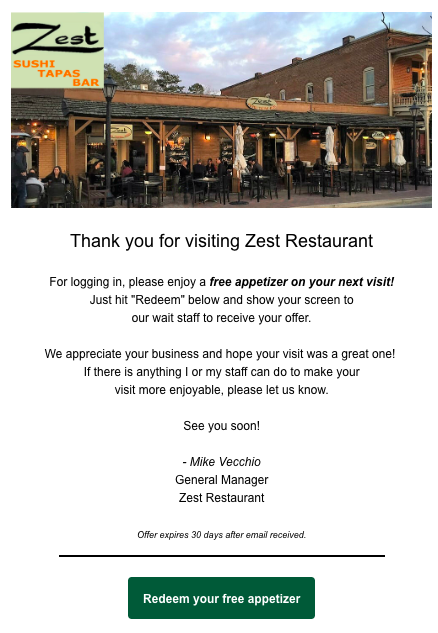
| Step 1: Guest receive emails (five different variations with different offers depending on how many times they visit. Must click Redeem to continue. M | |||||||||
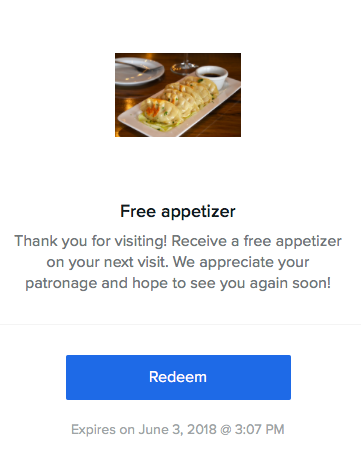
| Step 2: Guest hits the Redeem button. New screen pops up with the offer. Must hit redeem again in front of server. | |||||||||
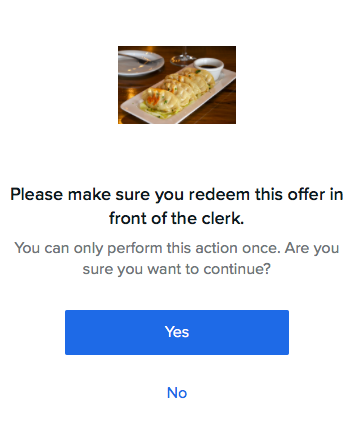
| Step 3: “Are you sure” messaging pops up. Once they hit Yes, the offer is only valid for the next five minutes then disappears. This should be done in front of or by server. | |||||||||
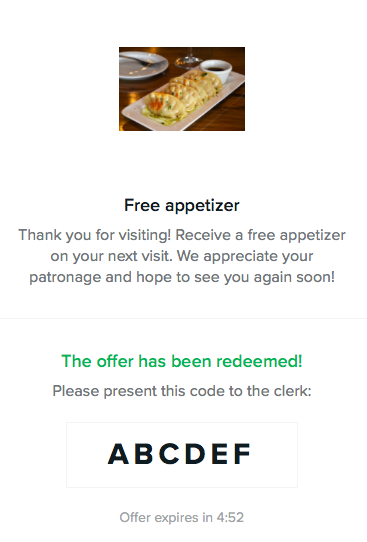
| Step 4: Offer is redeemed with “code” and expires. Server should use this discount on the order. | |||||||||
| Things to note: Servers should look to see what the offer is and thank the guest accordingly.-“It looks like you hadn’t visited in awhile, welcome back! Thank you for joining us again today”“Looks like you are a regular! Thank you for coming in today, we really appreciate you coming so often.”Code on redemption doesn’t really matter, but should be rung in under appropriate Zenreach comp on POS for trackingIf guest accidentally redeems before showing to server, look at date on email and if it’s within 30 days, honor it. |