Deprecated: Creation of dynamic property WP_Term::$cat_ID is deprecated in /home/cleanpla/public_html/mk/wp-includes/category.php on line 378
Deprecated: Creation of dynamic property WP_Term::$category_count is deprecated in /home/cleanpla/public_html/mk/wp-includes/category.php on line 379
Deprecated: Creation of dynamic property WP_Term::$category_description is deprecated in /home/cleanpla/public_html/mk/wp-includes/category.php on line 380
Deprecated: Creation of dynamic property WP_Term::$cat_name is deprecated in /home/cleanpla/public_html/mk/wp-includes/category.php on line 381
Deprecated: Creation of dynamic property WP_Term::$category_nicename is deprecated in /home/cleanpla/public_html/mk/wp-includes/category.php on line 382
Deprecated: Creation of dynamic property WP_Term::$category_parent is deprecated in /home/cleanpla/public_html/mk/wp-includes/category.php on line 383
https://mk.cleanplate.us/digital/posting-on-facebook/
Deprecated: Creation of dynamic property WP_Term::$cat_ID is deprecated in /home/cleanpla/public_html/mk/wp-includes/category.php on line 378
Deprecated: Creation of dynamic property WP_Term::$category_count is deprecated in /home/cleanpla/public_html/mk/wp-includes/category.php on line 379
Deprecated: Creation of dynamic property WP_Term::$category_description is deprecated in /home/cleanpla/public_html/mk/wp-includes/category.php on line 380
Deprecated: Creation of dynamic property WP_Term::$cat_name is deprecated in /home/cleanpla/public_html/mk/wp-includes/category.php on line 381
Deprecated: Creation of dynamic property WP_Term::$category_nicename is deprecated in /home/cleanpla/public_html/mk/wp-includes/category.php on line 382
Deprecated: Creation of dynamic property WP_Term::$category_parent is deprecated in /home/cleanpla/public_html/mk/wp-includes/category.php on line 383
Deprecated: Creation of dynamic property WP_Term::$category_count is deprecated in /home/cleanpla/public_html/mk/wp-includes/category.php on line 379
Deprecated: Creation of dynamic property WP_Term::$category_description is deprecated in /home/cleanpla/public_html/mk/wp-includes/category.php on line 380
Deprecated: Creation of dynamic property WP_Term::$cat_name is deprecated in /home/cleanpla/public_html/mk/wp-includes/category.php on line 381
Deprecated: Creation of dynamic property WP_Term::$category_nicename is deprecated in /home/cleanpla/public_html/mk/wp-includes/category.php on line 382
Deprecated: Creation of dynamic property WP_Term::$category_parent is deprecated in /home/cleanpla/public_html/mk/wp-includes/category.php on line 383
Why? To connect with your guests on social media and have an ongoing presence on their feed when not at the restaurant, as well as connect with those that may not have visited us before. This will lead to engagement, loyalty and increased sales. Expectation: Your goal is to post at least twice per week … ]]>
To connect with your guests on social media and have an ongoing presence on their feed when not at the restaurant, as well as connect with those that may not have visited us before. This will lead to engagement, loyalty and increased sales.
Expectation:
- Your goal is to post at least twice per week with engaging content on your Facebook page. You should include a photo or video and text description that makes your fans want to respond and interact with you.
- What does interaction mean?
- Likes, shares, comments, views or visiting the restaurant in response to what they saw. Every time a guest interacts with your post, it’s more likely to be shown to their friends.
- What does interaction mean?
More interactions= more views of your restaurant.
- Examples of engaging post content includes:
- Food photos (or videos)
- Daily specials
- Photos or videos of your team
- Menu features
- Flash deals
- Questions to your guests
- Contests
- Community involvement
- Event photos/cross promotion
- Photos of your guests in restaurant (with permission)
- Special hours of operation
- Holidays
- There should be at least one person trained in your restaurant on how to post on social media (if not more) and all posts should be approved by the GM.
- If you need help having someone added to a page, please contact Kathryn.
- It is helpful to have a plan at the beginning of the week or month of what you want to accomplish from your page. Having a clear, thought out plan with what you will be posting will keep you organized and keep content engaging for the guests.
How to Post on Facebook:
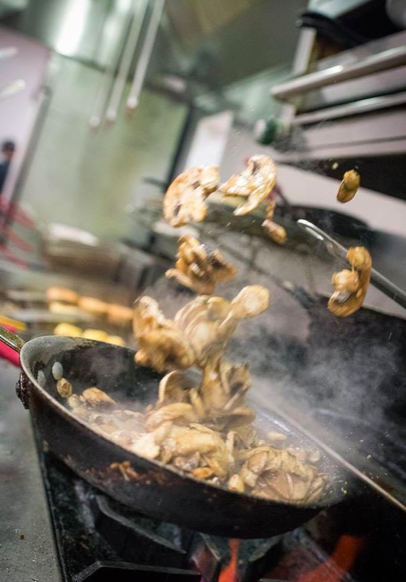
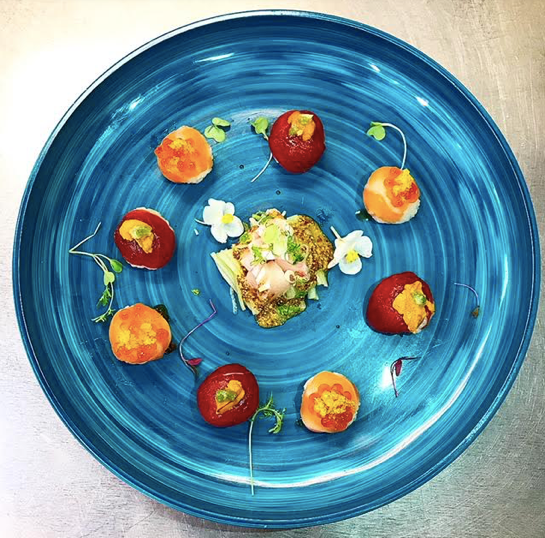
Always use a photo with a post. Decide what you’d like to feature and be sure to take or use a clear photo.
Tips:
- Use a flash or
be in a very well-lit area. Use real sunlight when possible.
- If a food
photo, menu item should appear as it would being served.
- Wipe off any drips or spills on the plate
- Place colorful items on a plain background with muted colors
- Ensure any background items look neat and clean (ie. If taking a photo of prep in the kitchen, make sure rags are away, prep boards are clean and garbage not overflowing)
- Don’t include too many things in the photo, keep it simple.
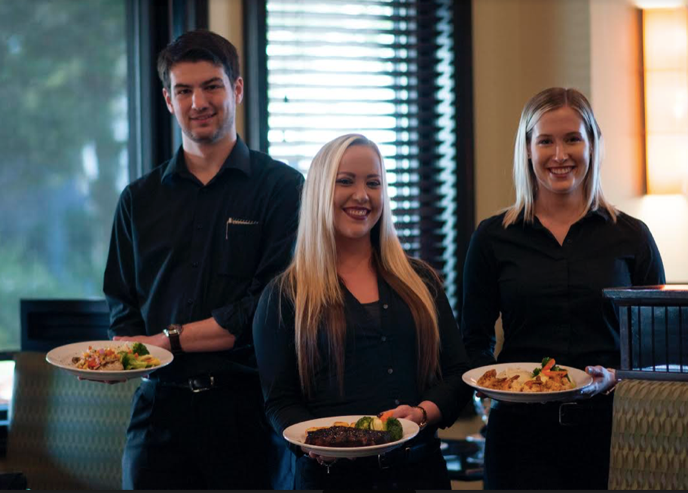
- If team members are in the photo, make sure they are smiling and uniforms look neat.
- Should not be blurry or hard to see item
- Always ask a guest for permission to post if including them.
- If a food
photo, menu item should appear as it would being served.
- Examples:
- Once you have the photo you’d like to post, go to your restaurant’s Facebook Page and scroll down until you see this:
- Click the Photo/Video button on the bottom left.
- Click Upload Photo/Video.
- Choose the photo or video you’d like to post in your library or take on live, and hit Choose on the bottom right.
- This should show you the photo on the post
- Now that you have your photo, write an engaging description
of it.
- Be sure all words are spelled correctly, correct grammar and punctuation is used and no slang.
- If your Facebook is linked and automatically posts to Instagram, use # as needed
- Ensure all information you listed is correct (dates, prices, etc)

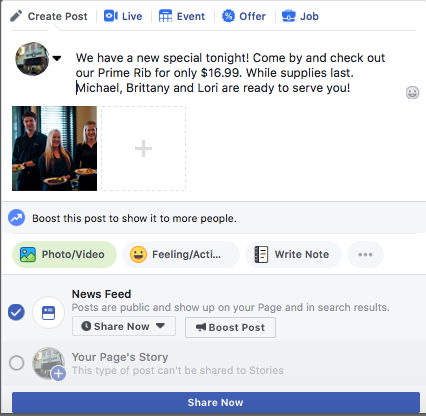
- Hit “Share Now” on the blue box on the bottom if ready to post immediately.
- If you’d like to post at a different day and time:
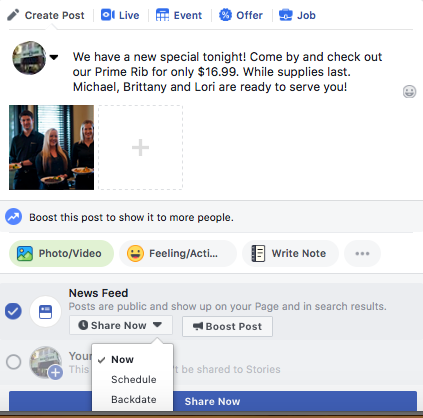
- Choose Share Now with the drop down arrow, then select Schedule. This will bring up a calendar to choose the date and time you’d like to schedule it to be posted.
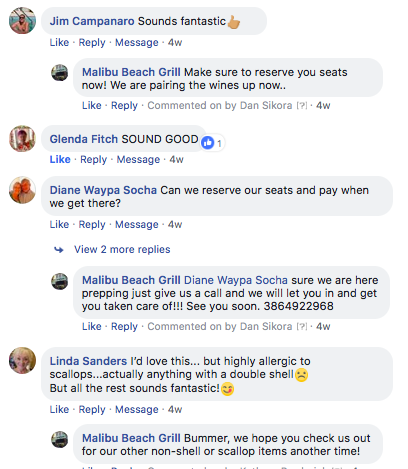
- Once it is posted, be on the lookout for your fans to comment on the post. If they do, be sure to respond to them with a like or comment back!
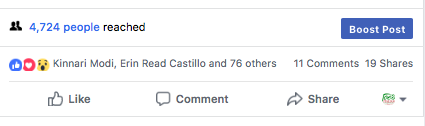
- You know you did something right when you see how many people you’ve reached with one post!
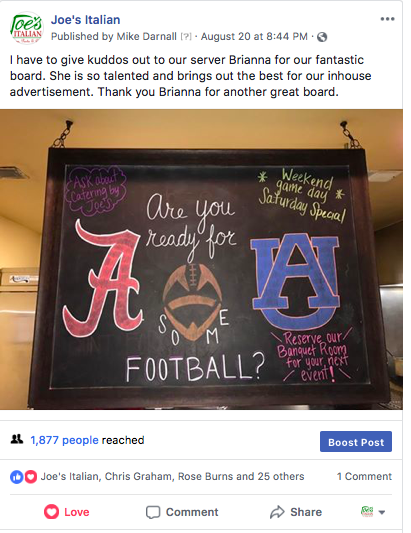
- If you do have a successful post or just have
something that would be great to promote even further, we can “boost” a post
with paid advertising. This should be done sparingly and only with your GM’s
permission. This means the post will go past your currently guests who like
your page and their friends and go to a new audience that we select.
- Please contact Kathryn for more information on this if interested.
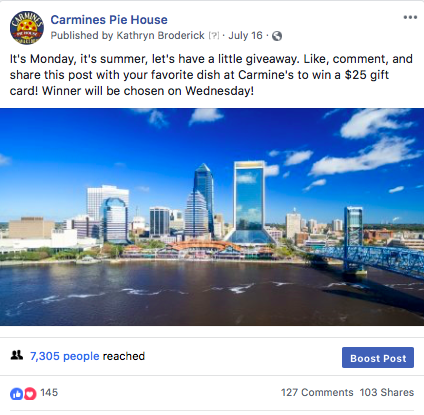
Example posts:
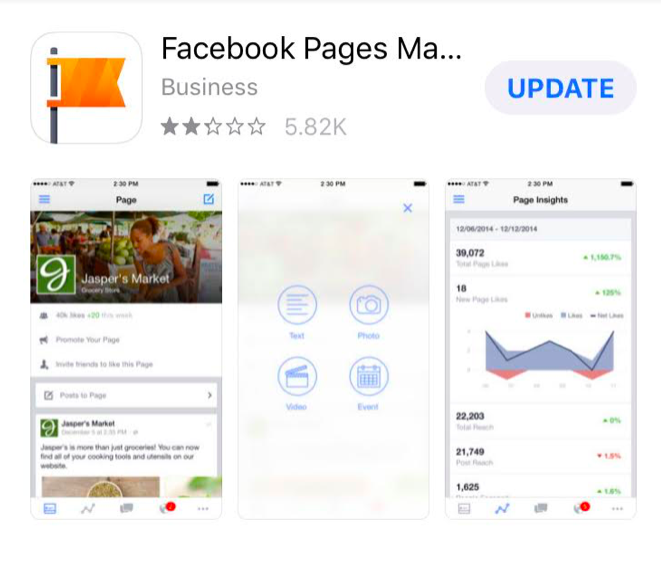
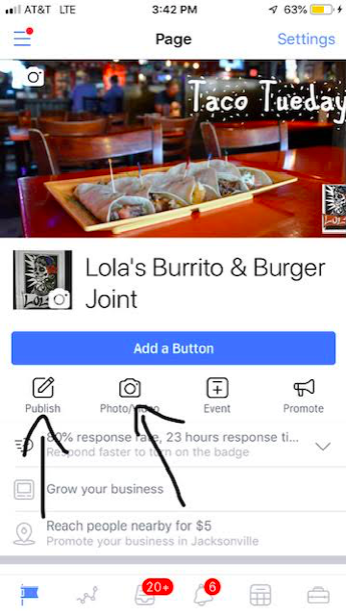
You can also post directly from your phone! To do so, download the Facebook Pages Manager app.
The steps to posting are similar to above.
Once you’ve decided on your content, go to your restaurant’s home screen. Look for the Photo/Video button (the publish button will let you write text as a post, but highly recommended to post a photo with your content)
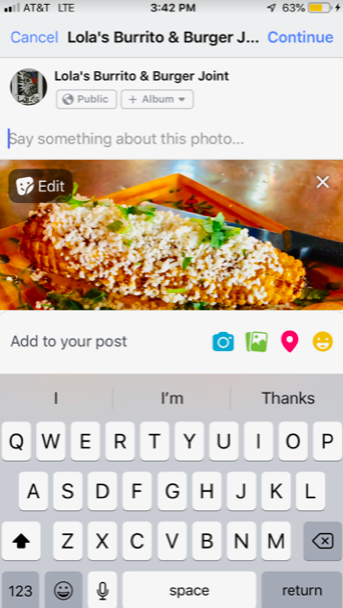
Click the Camera Photo/Video button and choose a photo from your library or take one live by choosing the grey camera icon on the far top left. Once chosen, the photo will appear.
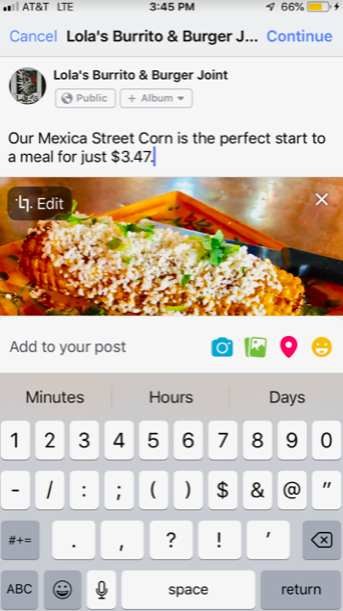
If this is the photo you want, now type in the text to describe it where it says “Say something about this photo”
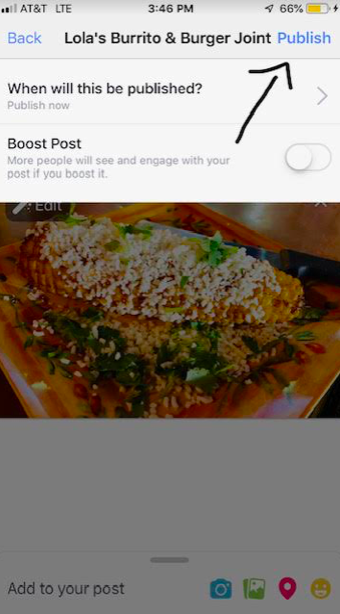
Once your post is finished, hit Continue in the upper right hand corner in blue. It will bring you to this screen.
Click Publish in the upper right hand corner in blue to publish immediately. You can also schedule posts from here.
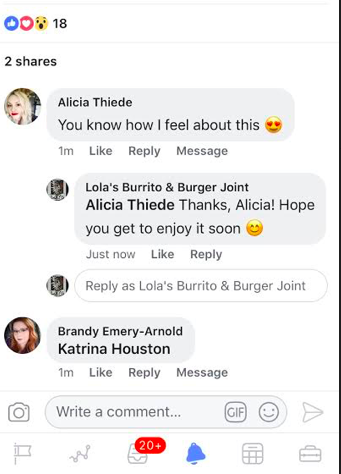
Be sure to monitor the app for replies to your post and respond back through the app to make it appear as you are responding as the restaurant instead of yourself!
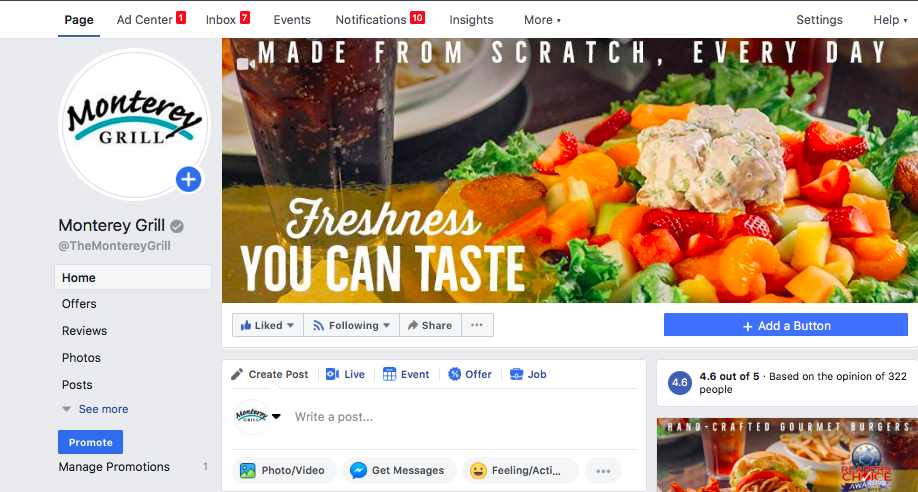
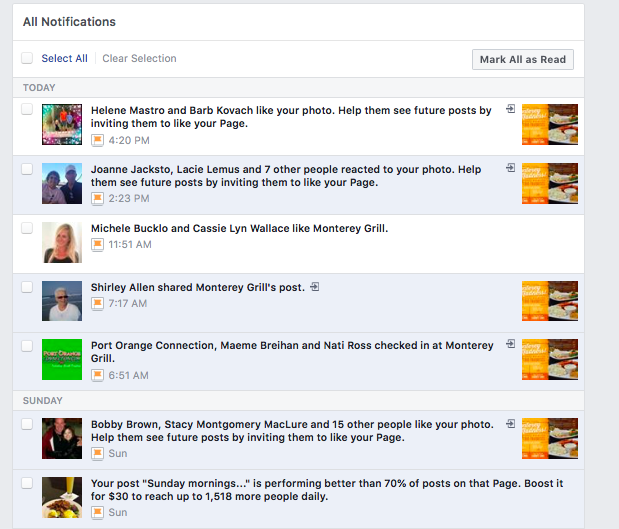
You’ll always know something happened on your page when you see the red box with a number in it next to one of the categories on the top. The Notifications tab shows you all new activity including messages, comments, likes, shares and check-ins. Some of these notifications may not be action worthy, but if you see something you can respond to, you should try.
Stay ahead of new information on your page by checking the notifications (you’ll know if something is unread by having a number with a red box).
These include new messages, comments, likes, shares and check-ins.
| Clicking on notifications will show you all of the new activity. | |||||||
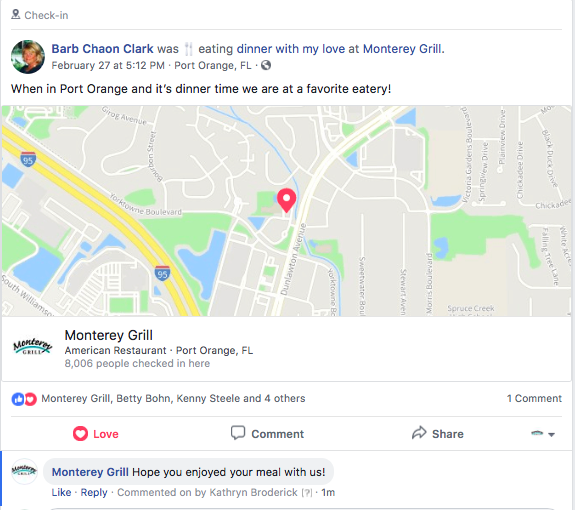
| If there are any action items (someone commented and you haven’t responded, you can invite people to like your page or you see a check-in), click on the highlighted blue area and it will take you to that screen. Check-ins are something I’d encourage you to try to stay on top of, even when not in the restaurant. Guests can choose to “check in” to any business and it tags us. Guests usually check in while still in the restaurant, so you can see how things are going in real time. Sometimes it just says they are there, other times it has more information like them saying it’s a birthday. Being able to immediately tell them we hope they enjoy, or happy birthday, or whatever it might be as they just get to the restaurant, let’s them know we are responsive and happens in real time. It’s a nice digital way to do a table touch. | |||||||
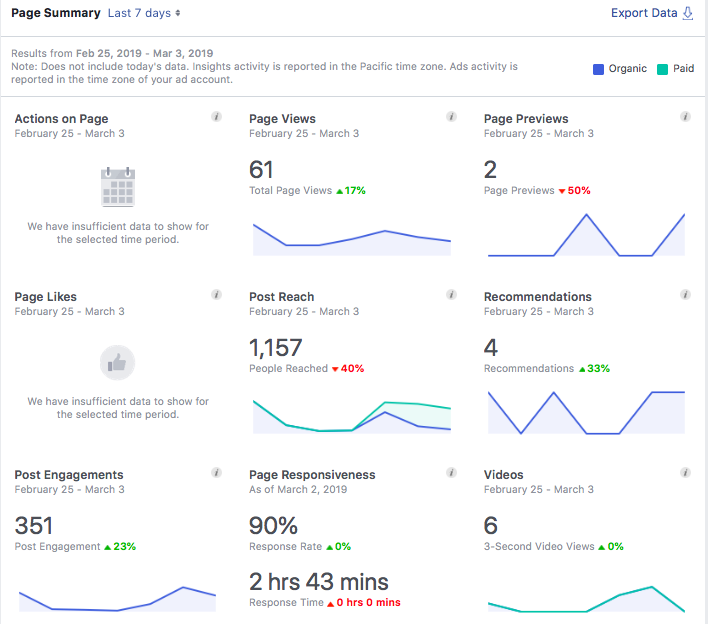
| Next to the Notifications tab is one called Insights, that really lets you know how you’re doing with your page. There’s a lot of information on this page, and you can click into any of the categories to see more. The thing I look for the most are Post Reach and Engagements. Post reach is your post got to their screen in any way, via scrolling through a feed or going directly to your page. It means someone definitely saw what you put out there. Post engagement is the next step that they went so far as to comment, like, share or click on your post. The higher these are, the better we’re doing. This view is just the past seven days. |
Insights Overview
You can see more info on specific posts when you change the date range to the past 28 days.
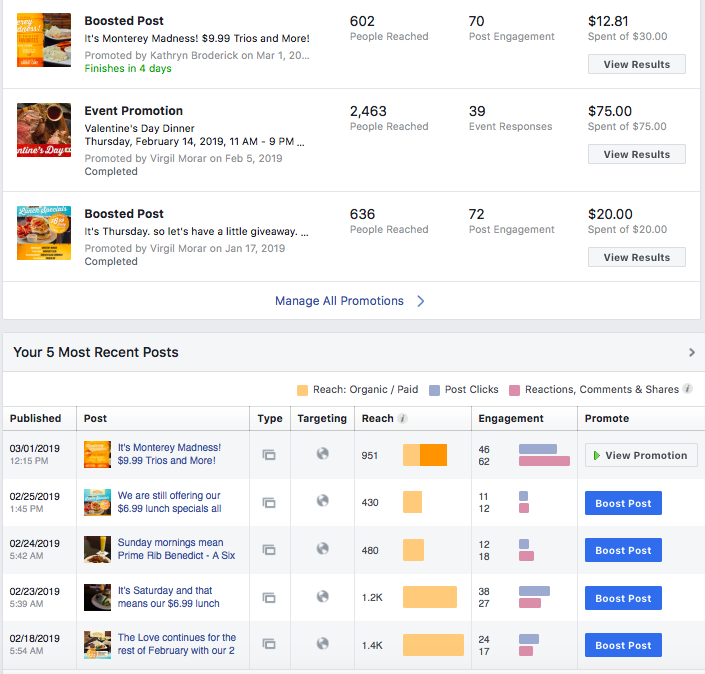
We run ads to promote page likes and boost specific posts on occasion. Please discuss with Kathryn and she will coordinate and budget. If we have a big promotion (ex: Valentine’s Day), putting $$ a day to promote it can help reach wider audiences.
*Note: Photos with more than 20% text can not be promoted and do not reach as far. Always try to use just a photo and fill in text above.
]]>Deprecated: Creation of dynamic property WP_Term::$cat_ID is deprecated in /home/cleanpla/public_html/mk/wp-includes/category.php on line 378
Deprecated: Creation of dynamic property WP_Term::$category_count is deprecated in /home/cleanpla/public_html/mk/wp-includes/category.php on line 379
Deprecated: Creation of dynamic property WP_Term::$category_description is deprecated in /home/cleanpla/public_html/mk/wp-includes/category.php on line 380
Deprecated: Creation of dynamic property WP_Term::$cat_name is deprecated in /home/cleanpla/public_html/mk/wp-includes/category.php on line 381
Deprecated: Creation of dynamic property WP_Term::$category_nicename is deprecated in /home/cleanpla/public_html/mk/wp-includes/category.php on line 382
Deprecated: Creation of dynamic property WP_Term::$category_parent is deprecated in /home/cleanpla/public_html/mk/wp-includes/category.php on line 383
https://mk.cleanplate.us/digital/posting-on-instagram/
Deprecated: Creation of dynamic property WP_Term::$cat_ID is deprecated in /home/cleanpla/public_html/mk/wp-includes/category.php on line 378
Deprecated: Creation of dynamic property WP_Term::$category_count is deprecated in /home/cleanpla/public_html/mk/wp-includes/category.php on line 379
Deprecated: Creation of dynamic property WP_Term::$category_description is deprecated in /home/cleanpla/public_html/mk/wp-includes/category.php on line 380
Deprecated: Creation of dynamic property WP_Term::$cat_name is deprecated in /home/cleanpla/public_html/mk/wp-includes/category.php on line 381
Deprecated: Creation of dynamic property WP_Term::$category_nicename is deprecated in /home/cleanpla/public_html/mk/wp-includes/category.php on line 382
Deprecated: Creation of dynamic property WP_Term::$category_parent is deprecated in /home/cleanpla/public_html/mk/wp-includes/category.php on line 383
Deprecated: Creation of dynamic property WP_Term::$category_count is deprecated in /home/cleanpla/public_html/mk/wp-includes/category.php on line 379
Deprecated: Creation of dynamic property WP_Term::$category_description is deprecated in /home/cleanpla/public_html/mk/wp-includes/category.php on line 380
Deprecated: Creation of dynamic property WP_Term::$cat_name is deprecated in /home/cleanpla/public_html/mk/wp-includes/category.php on line 381
Deprecated: Creation of dynamic property WP_Term::$category_nicename is deprecated in /home/cleanpla/public_html/mk/wp-includes/category.php on line 382
Deprecated: Creation of dynamic property WP_Term::$category_parent is deprecated in /home/cleanpla/public_html/mk/wp-includes/category.php on line 383
Instagram is becoming more and more popular, especially with younger audiences. While posting on Facebook should be your priority, linking your Instagram or taking photos specifically for your Instagram page can be a great next step in your social media plan. It is sometimes a different audience than Facebook, and gives those not ”connected” to … ]]>
A hashtag # gives people a way to search for something in the same topic. For example, if I want to look up restaurant photos in Jacksonville, I might search the term #jaxrestaurants . Even though you may not know a specific hashtag, as you start typing, suggestions will pop up to search. You can even do generic searches like #food and scroll through photos.
How to post:
First, enter the login information and hit the + button on the bottom or go to your profile screen:
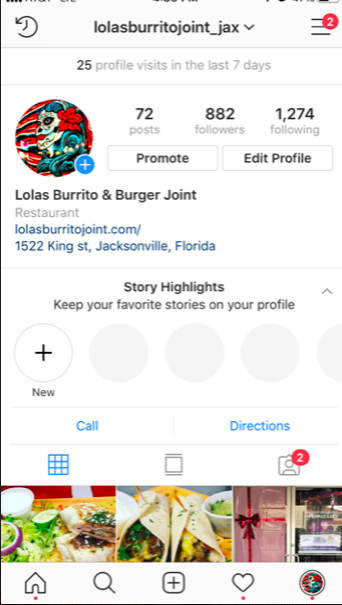
This will allow you to take a photo on the spot or choose one from your library.
| Once you have your selected photo, hit the blue Next in the upper right hand corner to bring you to editing. |
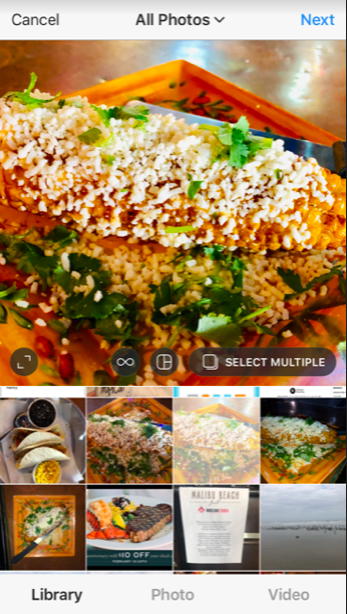
| You can also choose to take video. Just select what option you’d like on the bottom of the screen. | |||
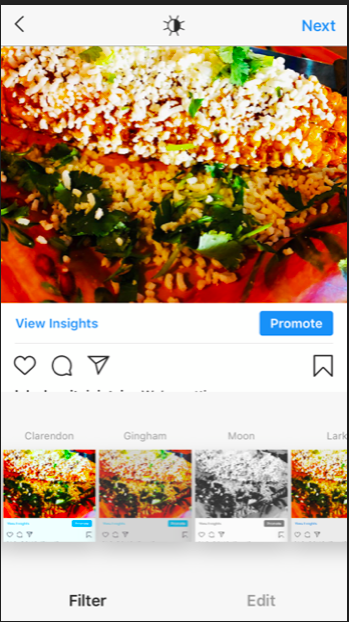
| You can choose a filter (shows your photo in different ways, scroll through to see options) or do regular editing (crop, brightness, etc) on the bottom. Once you are satisfied with how it looks, hit Next on the top. |
From there, it’s time to post your caption. You can tag different brands or people in your post with the @ sign and use hashtags # to allow people to do searches and find you.
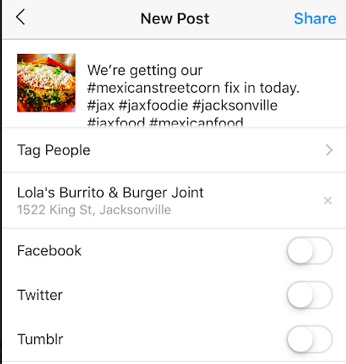
| If you have a Facebook account (all of you do) to link, you should. This gives you double the exposure and half the work of posting twice. Once ready, hit Share on the top to post. | |||||||
| This will inform you of how many likes and comments you’ve received. Click to it to view more information and respond to comments. | |||||||
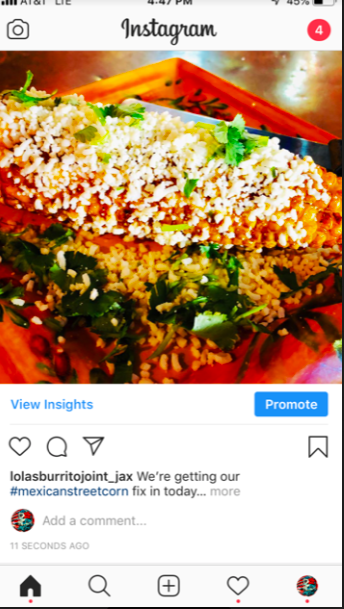
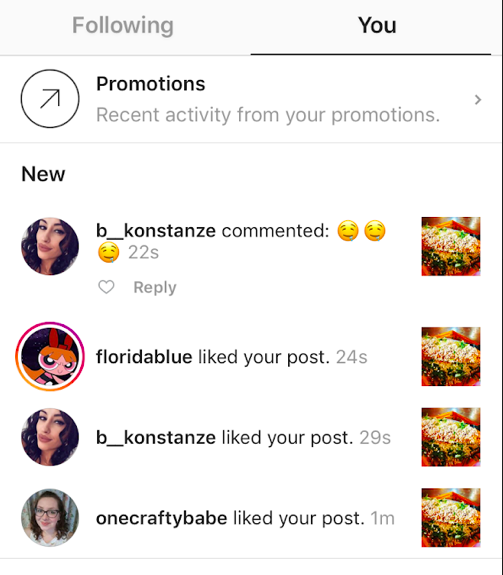
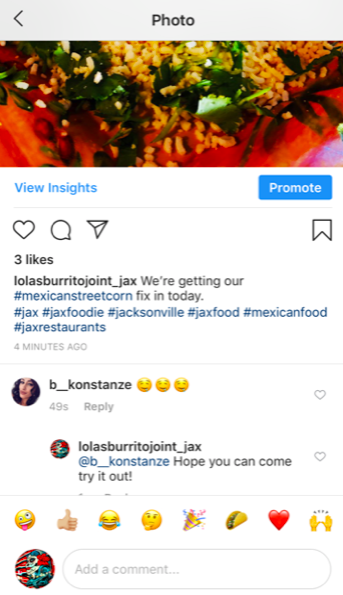
| Don’t forget to respond to any comments you get! |
Deprecated: Creation of dynamic property WP_Term::$cat_ID is deprecated in /home/cleanpla/public_html/mk/wp-includes/category.php on line 378
Deprecated: Creation of dynamic property WP_Term::$category_count is deprecated in /home/cleanpla/public_html/mk/wp-includes/category.php on line 379
Deprecated: Creation of dynamic property WP_Term::$category_description is deprecated in /home/cleanpla/public_html/mk/wp-includes/category.php on line 380
Deprecated: Creation of dynamic property WP_Term::$cat_name is deprecated in /home/cleanpla/public_html/mk/wp-includes/category.php on line 381
Deprecated: Creation of dynamic property WP_Term::$category_nicename is deprecated in /home/cleanpla/public_html/mk/wp-includes/category.php on line 382
Deprecated: Creation of dynamic property WP_Term::$category_parent is deprecated in /home/cleanpla/public_html/mk/wp-includes/category.php on line 383
https://mk.cleanplate.us/digital/email-marketing/
Deprecated: Creation of dynamic property WP_Term::$cat_ID is deprecated in /home/cleanpla/public_html/mk/wp-includes/category.php on line 378
Deprecated: Creation of dynamic property WP_Term::$category_count is deprecated in /home/cleanpla/public_html/mk/wp-includes/category.php on line 379
Deprecated: Creation of dynamic property WP_Term::$category_description is deprecated in /home/cleanpla/public_html/mk/wp-includes/category.php on line 380
Deprecated: Creation of dynamic property WP_Term::$cat_name is deprecated in /home/cleanpla/public_html/mk/wp-includes/category.php on line 381
Deprecated: Creation of dynamic property WP_Term::$category_nicename is deprecated in /home/cleanpla/public_html/mk/wp-includes/category.php on line 382
Deprecated: Creation of dynamic property WP_Term::$category_parent is deprecated in /home/cleanpla/public_html/mk/wp-includes/category.php on line 383
Deprecated: Creation of dynamic property WP_Term::$category_count is deprecated in /home/cleanpla/public_html/mk/wp-includes/category.php on line 379
Deprecated: Creation of dynamic property WP_Term::$category_description is deprecated in /home/cleanpla/public_html/mk/wp-includes/category.php on line 380
Deprecated: Creation of dynamic property WP_Term::$cat_name is deprecated in /home/cleanpla/public_html/mk/wp-includes/category.php on line 381
Deprecated: Creation of dynamic property WP_Term::$category_nicename is deprecated in /home/cleanpla/public_html/mk/wp-includes/category.php on line 382
Deprecated: Creation of dynamic property WP_Term::$category_parent is deprecated in /home/cleanpla/public_html/mk/wp-includes/category.php on line 383
Why? Email is one of the most direct ways to get information to an audience. Most people check email every day, and many check at least 20 times per day. Email goes directly to a customer’s inbox and a catchy subject line with information relevant to them will help get them to open it and … ]]>
Email is one of the most direct ways to get information to an audience. Most people check email every day, and many check at least 20 times per day. Email goes directly to a customer’s inbox and a catchy subject line with information relevant to them will help get them to open it and read about your business.
Estimated Time to Execute:
- The Marketing Manager will create the email blasts, you just need to provide any relevant content to include. This should take minimal time per month.
What:
- We have about 40,000 email subscribers across all our restaurants- which means 40,000 people who have opted in and WANT to hear more about what’s happening at your restaurant. Email can be a way to push sales immediately.
- It also gives us a chance to be very reactive if something happens we’re not expecting, like a sudden closure of the restaurant for maintenance or weather. It’s an immediate way to communicate with our guests.
- We also have “Smart Emails” which automatically track how often our guests are visiting and it sends automated emails for us to promote visiting more often.
How to Execute:
- The
restaurant has two responsibilities in terms of email marketing.
- Ensure servers know that our Wifi is connected to our email club. They should work to mention this to guests to keep increasing our signups (see below for more info)
- Let
the Marketing Manager know what content you’d like sent out in your email that
month or if you’d like multiple emails.
- Be
sure to include:
- All information such as date, specials, food descriptions
- Photos (the more the better!)
- Date to send if specific
- Some
email content that really is relevant to guests are:
- New Menu updates
- Special events
- Food holidays with specials
- Anniversary/Birthday event
- Monthly promotions
- Anything else important!
- Be
sure to include:
- In general, the more information you can send to the Marketing Manager, the better!
Deprecated: Creation of dynamic property WP_Term::$cat_ID is deprecated in /home/cleanpla/public_html/mk/wp-includes/category.php on line 378
Deprecated: Creation of dynamic property WP_Term::$category_count is deprecated in /home/cleanpla/public_html/mk/wp-includes/category.php on line 379
Deprecated: Creation of dynamic property WP_Term::$category_description is deprecated in /home/cleanpla/public_html/mk/wp-includes/category.php on line 380
Deprecated: Creation of dynamic property WP_Term::$cat_name is deprecated in /home/cleanpla/public_html/mk/wp-includes/category.php on line 381
Deprecated: Creation of dynamic property WP_Term::$category_nicename is deprecated in /home/cleanpla/public_html/mk/wp-includes/category.php on line 382
Deprecated: Creation of dynamic property WP_Term::$category_parent is deprecated in /home/cleanpla/public_html/mk/wp-includes/category.php on line 383
https://mk.cleanplate.us/digital/zenreach-tripadvisor-wifi/
Deprecated: Creation of dynamic property WP_Term::$cat_ID is deprecated in /home/cleanpla/public_html/mk/wp-includes/category.php on line 378
Deprecated: Creation of dynamic property WP_Term::$category_count is deprecated in /home/cleanpla/public_html/mk/wp-includes/category.php on line 379
Deprecated: Creation of dynamic property WP_Term::$category_description is deprecated in /home/cleanpla/public_html/mk/wp-includes/category.php on line 380
Deprecated: Creation of dynamic property WP_Term::$cat_name is deprecated in /home/cleanpla/public_html/mk/wp-includes/category.php on line 381
Deprecated: Creation of dynamic property WP_Term::$category_nicename is deprecated in /home/cleanpla/public_html/mk/wp-includes/category.php on line 382
Deprecated: Creation of dynamic property WP_Term::$category_parent is deprecated in /home/cleanpla/public_html/mk/wp-includes/category.php on line 383
Deprecated: Creation of dynamic property WP_Term::$category_count is deprecated in /home/cleanpla/public_html/mk/wp-includes/category.php on line 379
Deprecated: Creation of dynamic property WP_Term::$category_description is deprecated in /home/cleanpla/public_html/mk/wp-includes/category.php on line 380
Deprecated: Creation of dynamic property WP_Term::$cat_name is deprecated in /home/cleanpla/public_html/mk/wp-includes/category.php on line 381
Deprecated: Creation of dynamic property WP_Term::$category_nicename is deprecated in /home/cleanpla/public_html/mk/wp-includes/category.php on line 382
Deprecated: Creation of dynamic property WP_Term::$category_parent is deprecated in /home/cleanpla/public_html/mk/wp-includes/category.php on line 383
What: Every restaurant in our system has a free WiFi network (original 13 has Zenreach, MarketPlace Grill has TripAdvisor WiFi). This generally is a network that says “Restaurant Name_Free”. If you do not have this free Wifi working correctly through the entire restaurant, please contact Kathryn immediately to troubleshoot. This free WiFi not only gives … ]]>
Every restaurant in our system has a free WiFi network (original 13 has Zenreach, MarketPlace Grill has TripAdvisor WiFi). This generally is a network that says “Restaurant Name_Free”. If you do not have this free Wifi working correctly through the entire restaurant, please contact Kathryn immediately to troubleshoot.
This free WiFi not only gives our guests a service, it also is a seamless way to gain new email subscribers. Any guest who logs in, they will automatically be signed up to get information from the restaurant.
*Those who login can unsubscribe at any time
Why is this important?
There are many ways to reach consumers, but being able to directly target guests who were in our restaurant can be invaluable. This gives us a direct line of communication to let them know about promotions, new menu items, emergency closures, etc. Each time we gain a new email subscriber, we are more likely to have them more “in the know” and visit more often. More email subscribers= more restaurant sales. This also gives us a loyalty program to send consumers offers based on how often they visit and increase visits and spending.
Execution:
- Servers should mention
to guests that there is free WiFi available if the guest needs it (let them
know the name to look for).
- This is ideally done towards the beginning of the meal
- Servers can follow-up
towards the end of the meal by letting know guests if they’d like to get more
communication from the restaurant, including deals, coupons and menu news and
more, they can log into our WiFi to automatically sign up for emails.
- Everyone who joins for the first time will receive a
welcome email with an offer. Offers vary by restaurant. If you’d like to know
what yours is or get it changed, contact Kathryn ASAP (not valid for MPG)
- Note: We currently send emails 1-2 times a month per restaurant. Loyalty emails may send offers more frequently.
- The more times a guest logs into our WiFi, the more likely they are to receive more offers for their next visit (see Zenreach Redemption Sheet on how to accept those offers)
- Everyone who joins for the first time will receive a
welcome email with an offer. Offers vary by restaurant. If you’d like to know
what yours is or get it changed, contact Kathryn ASAP (not valid for MPG)
- For those that want to go above and beyond, we can collect
email addresses at off-premise events with signup sheets, business cards from
visiting businesses, chamber events and more.
- Kathryn can upload emails from an Excel sheet if you have names and email (please make sure you have permission to use this information)
How-to Redeem Zenreach offers:
| Step 1: Guest receive emails (five different variations with different offers depending on how many times they visit. Must click Redeem to continue. M | |||||||||
| Step 2: Guest hits the Redeem button. New screen pops up with the offer. Must hit redeem again in front of server. | |||||||||
| Step 3: “Are you sure” messaging pops up. Once they hit Yes, the offer is only valid for the next five minutes then disappears. This should be done in front of or by server. | |||||||||
| Step 4: Offer is redeemed with “code” and expires. Server should use this discount on the order. | |||||||||
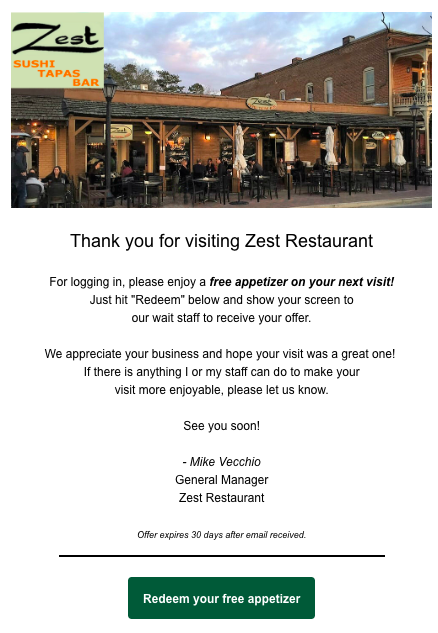
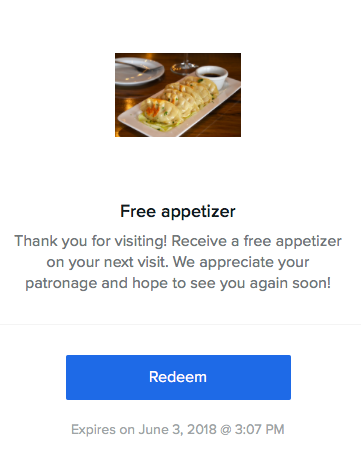
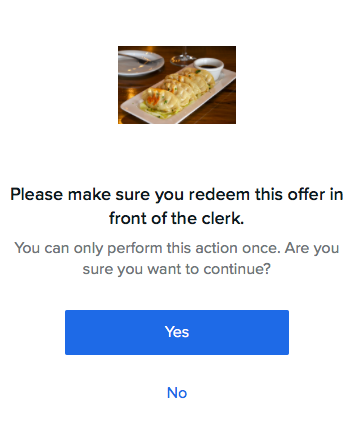
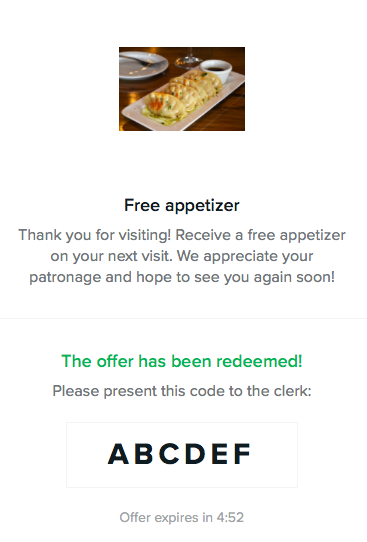
| Things to note: Servers should look to see what the offer is and thank the guest accordingly.-“It looks like you hadn’t visited in awhile, welcome back! Thank you for joining us again today”“Looks like you are a regular! Thank you for coming in today, we really appreciate you coming so often.”Code on redemption doesn’t really matter, but should be rung in under appropriate Zenreach comp on POS for trackingIf guest accidentally redeems before showing to server, look at date on email and if it’s within 30 days, honor it. |
]]>
Deprecated: Creation of dynamic property WP_Term::$cat_ID is deprecated in /home/cleanpla/public_html/mk/wp-includes/category.php on line 378
Deprecated: Creation of dynamic property WP_Term::$category_count is deprecated in /home/cleanpla/public_html/mk/wp-includes/category.php on line 379
Deprecated: Creation of dynamic property WP_Term::$category_description is deprecated in /home/cleanpla/public_html/mk/wp-includes/category.php on line 380
Deprecated: Creation of dynamic property WP_Term::$cat_name is deprecated in /home/cleanpla/public_html/mk/wp-includes/category.php on line 381
Deprecated: Creation of dynamic property WP_Term::$category_nicename is deprecated in /home/cleanpla/public_html/mk/wp-includes/category.php on line 382
Deprecated: Creation of dynamic property WP_Term::$category_parent is deprecated in /home/cleanpla/public_html/mk/wp-includes/category.php on line 383
https://mk.cleanplate.us/digital/growing-reviews-and-scores/
Deprecated: Creation of dynamic property WP_Term::$cat_ID is deprecated in /home/cleanpla/public_html/mk/wp-includes/category.php on line 378
Deprecated: Creation of dynamic property WP_Term::$category_count is deprecated in /home/cleanpla/public_html/mk/wp-includes/category.php on line 379
Deprecated: Creation of dynamic property WP_Term::$category_description is deprecated in /home/cleanpla/public_html/mk/wp-includes/category.php on line 380
Deprecated: Creation of dynamic property WP_Term::$cat_name is deprecated in /home/cleanpla/public_html/mk/wp-includes/category.php on line 381
Deprecated: Creation of dynamic property WP_Term::$category_nicename is deprecated in /home/cleanpla/public_html/mk/wp-includes/category.php on line 382
Deprecated: Creation of dynamic property WP_Term::$category_parent is deprecated in /home/cleanpla/public_html/mk/wp-includes/category.php on line 383
Deprecated: Creation of dynamic property WP_Term::$category_count is deprecated in /home/cleanpla/public_html/mk/wp-includes/category.php on line 379
Deprecated: Creation of dynamic property WP_Term::$category_description is deprecated in /home/cleanpla/public_html/mk/wp-includes/category.php on line 380
Deprecated: Creation of dynamic property WP_Term::$cat_name is deprecated in /home/cleanpla/public_html/mk/wp-includes/category.php on line 381
Deprecated: Creation of dynamic property WP_Term::$category_nicename is deprecated in /home/cleanpla/public_html/mk/wp-includes/category.php on line 382
Deprecated: Creation of dynamic property WP_Term::$category_parent is deprecated in /home/cleanpla/public_html/mk/wp-includes/category.php on line 383
Why do reviews matter? Better Reviews get you found more: Increasingly, people turn to their phones to discover new restaurants and check out places they have heard about. When ranking restaurants for search, Google considers 3 things: 1. Relevance 2. Proximity 3. Reputation ➢ Examples: “Best Sushi”, “Best Restaurant”, “Best Steak” Better Reviews get more … ]]>
Better Reviews get you found more:
- Increasingly, people turn to their phones to discover new restaurants and check out places they have heard about.
- When ranking restaurants
for search, Google considers 3 things:
- 1.
Relevance 2. Proximity 3. Reputation
- ➢ Examples: “Best Sushi”, “Best Restaurant”, “Best Steak”
- 1.
Relevance 2. Proximity 3. Reputation
Better Reviews get more guests who find you online to come in and eat and help you build sales:
- 87% of consumer won’t consider a local restaurant with low ratings
- 44% of consumers pay attention to the quantity of reviews and how recent they are
- Increasing your score by 1⁄2 star results in an increase of 2-5% of sales.
- 77 percent of consumers pay more attention to consumer reviews than to professional critic reviews
- 33 percent of frequent restaurant-goers would never eat at a restaurant with an average review score of less than 4 stars (out of 5) on online review websites like Yelp, Google, and Facebook.
- 60 percent read reviews before going out for a meal
- A half star rating increase on Yelp can lead to it being 30-49% likely that restaurant will sell out seats during peak hours
- 53% of customers expect businesses to reply to their online reviews within 7 days
Reviews can also be a good source of intelligence about what is going wrong AND right in your restaurant:
- Spot
trends you may have missed
- See issues that happen when you’re not there
So how can you grow reviews? In a word, ask!
Customers who are dissatisfied and angry are motivated to leave reviews out of spite. But happy customers often don’t think about it. Most satisfied customers will be happy to leave a great review if the server or manager just asks them to do it.
Here
is an example:
Server when delivering the check or Manager at a table touch towards the end of
the meal:
• “Was everything as excellent as it
should have been tonight?”
o
If “no” –
follow up and ask why and use the Five A’s method. Get the manager if needed.
Five A’s:
- Awareness: Many mistakes go unaddressed because no one is even aware they have happened. If you’re not aware, you’re nowhere.
- Acknowledgement: “Our server had an accident, and we are going to prepare a new plate for you as quickly as possible.”
- Apology: “I am so sorry this happened to you.” Alibis are not one of the Five A’s. It is not appropriate or useful to make excuses (“We’re short-staffed.”)
- Action: “Please enjoy this for now. We’ll have your fresh order out in just a few minutes.” Say what you are going to do to make amends then follow through.
- Additional Generosity: Unless the mistake had to do with slow timing, I would instruct my staff to send out something additional (a complimentary dessert or wine) to thank the guests for having been good sports. Some more serious mistakes warrant a complimentary dish or meal.
If “yes” – “That’s wonderful to hear. I’m so glad you enjoyed the [steak and chicken]. Can I ask you to take a minute and leave us a 5 star review online? I’d really appreciate it. And it helps support our local business. Thank you and hope to see you back soon!”
Tips and Tricks from your peers:
- Be authentic and natural in your approach, make it part of the dialogue not something awkward to stick in
- Train your servers to ask, but also have GM follow up with a table touch to ensure everything was great and ask to support us with a review
- Use the “local” aspect. The best way to support a local small business is to leave a public review and tell others about it.
- Keep the entire team aware of progress! Post reviews for all to see, celebrate server wins, have a goal and make sure everyone knows it!
Deprecated: Creation of dynamic property WP_Term::$cat_ID is deprecated in /home/cleanpla/public_html/mk/wp-includes/category.php on line 378
Deprecated: Creation of dynamic property WP_Term::$category_count is deprecated in /home/cleanpla/public_html/mk/wp-includes/category.php on line 379
Deprecated: Creation of dynamic property WP_Term::$category_description is deprecated in /home/cleanpla/public_html/mk/wp-includes/category.php on line 380
Deprecated: Creation of dynamic property WP_Term::$cat_name is deprecated in /home/cleanpla/public_html/mk/wp-includes/category.php on line 381
Deprecated: Creation of dynamic property WP_Term::$category_nicename is deprecated in /home/cleanpla/public_html/mk/wp-includes/category.php on line 382
Deprecated: Creation of dynamic property WP_Term::$category_parent is deprecated in /home/cleanpla/public_html/mk/wp-includes/category.php on line 383
https://mk.cleanplate.us/digital/website/
Deprecated: Creation of dynamic property WP_Term::$cat_ID is deprecated in /home/cleanpla/public_html/mk/wp-includes/category.php on line 378
Deprecated: Creation of dynamic property WP_Term::$category_count is deprecated in /home/cleanpla/public_html/mk/wp-includes/category.php on line 379
Deprecated: Creation of dynamic property WP_Term::$category_description is deprecated in /home/cleanpla/public_html/mk/wp-includes/category.php on line 380
Deprecated: Creation of dynamic property WP_Term::$cat_name is deprecated in /home/cleanpla/public_html/mk/wp-includes/category.php on line 381
Deprecated: Creation of dynamic property WP_Term::$category_nicename is deprecated in /home/cleanpla/public_html/mk/wp-includes/category.php on line 382
Deprecated: Creation of dynamic property WP_Term::$category_parent is deprecated in /home/cleanpla/public_html/mk/wp-includes/category.php on line 383
Deprecated: Creation of dynamic property WP_Term::$category_count is deprecated in /home/cleanpla/public_html/mk/wp-includes/category.php on line 379
Deprecated: Creation of dynamic property WP_Term::$category_description is deprecated in /home/cleanpla/public_html/mk/wp-includes/category.php on line 380
Deprecated: Creation of dynamic property WP_Term::$cat_name is deprecated in /home/cleanpla/public_html/mk/wp-includes/category.php on line 381
Deprecated: Creation of dynamic property WP_Term::$category_nicename is deprecated in /home/cleanpla/public_html/mk/wp-includes/category.php on line 382
Deprecated: Creation of dynamic property WP_Term::$category_parent is deprecated in /home/cleanpla/public_html/mk/wp-includes/category.php on line 383
What: Every restaurant has a website and is generally one of the first sources of information guests use to determine if they’d like to visit. The website includes photos, menu, hours, catering information, specials and more. It is essential we keep this updated so all guests have correct information. Why is this important? Our website … ]]>
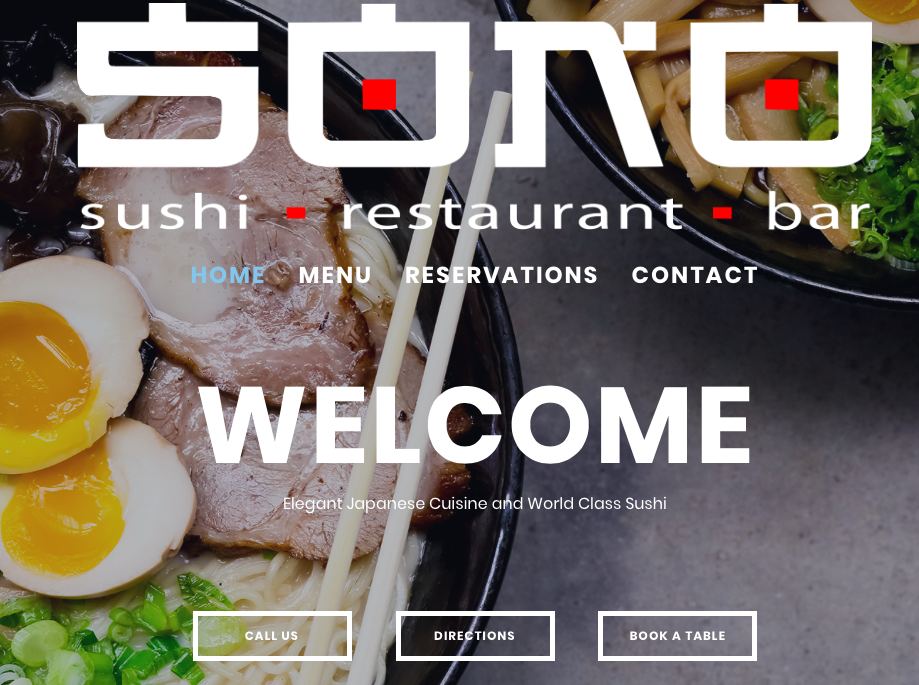
Every restaurant has a website and is generally one of the first sources of information guests use to determine if they’d like to visit. The website includes photos, menu, hours, catering information, specials and more. It is essential we keep this updated so all guests have correct information.
Why is this important?
Our website also opens us up to new audiences and brings us up in search results on Google or other platforms. If the website is not correct, we may not bring in those new guests to build sales.
Execution:
- There is not much the restaurant needs to do to maintain
their website, this is all done by Ford. Ford can be contacted at domains@cleanplaterestaurants.com.
- However, it is
important for managers to periodically check their website to make sure all
information is correct.
- In the following situations, managers should be proactive
about upcoming changes such as:
- New menu or menu revisions
- Summer or holiday hours
- Change of daily or weekly specials
- A new addition (catering, delivery, online ordering, etc)
- New photography taken
- Management change (info email will need to be sent to a new GM)
- Reservation platform change (OpenTable, Resy, etc)
- Any other important information
- Please send new information at least two weeks in advance of needing the update on the website. If needed sooner, please give the timeline.
- In the following situations, managers should be proactive
about upcoming changes such as:
- However, it is
important for managers to periodically check their website to make sure all
information is correct.
Deprecated: Creation of dynamic property WP_Term::$cat_ID is deprecated in /home/cleanpla/public_html/mk/wp-includes/category.php on line 378
Deprecated: Creation of dynamic property WP_Term::$category_count is deprecated in /home/cleanpla/public_html/mk/wp-includes/category.php on line 379
Deprecated: Creation of dynamic property WP_Term::$category_description is deprecated in /home/cleanpla/public_html/mk/wp-includes/category.php on line 380
Deprecated: Creation of dynamic property WP_Term::$cat_name is deprecated in /home/cleanpla/public_html/mk/wp-includes/category.php on line 381
Deprecated: Creation of dynamic property WP_Term::$category_nicename is deprecated in /home/cleanpla/public_html/mk/wp-includes/category.php on line 382
Deprecated: Creation of dynamic property WP_Term::$category_parent is deprecated in /home/cleanpla/public_html/mk/wp-includes/category.php on line 383
https://mk.cleanplate.us/digital/blogger-and-instagram-influencer-visits/
Deprecated: Creation of dynamic property WP_Term::$cat_ID is deprecated in /home/cleanpla/public_html/mk/wp-includes/category.php on line 378
Deprecated: Creation of dynamic property WP_Term::$category_count is deprecated in /home/cleanpla/public_html/mk/wp-includes/category.php on line 379
Deprecated: Creation of dynamic property WP_Term::$category_description is deprecated in /home/cleanpla/public_html/mk/wp-includes/category.php on line 380
Deprecated: Creation of dynamic property WP_Term::$cat_name is deprecated in /home/cleanpla/public_html/mk/wp-includes/category.php on line 381
Deprecated: Creation of dynamic property WP_Term::$category_nicename is deprecated in /home/cleanpla/public_html/mk/wp-includes/category.php on line 382
Deprecated: Creation of dynamic property WP_Term::$category_parent is deprecated in /home/cleanpla/public_html/mk/wp-includes/category.php on line 383
Deprecated: Creation of dynamic property WP_Term::$category_count is deprecated in /home/cleanpla/public_html/mk/wp-includes/category.php on line 379
Deprecated: Creation of dynamic property WP_Term::$category_description is deprecated in /home/cleanpla/public_html/mk/wp-includes/category.php on line 380
Deprecated: Creation of dynamic property WP_Term::$cat_name is deprecated in /home/cleanpla/public_html/mk/wp-includes/category.php on line 381
Deprecated: Creation of dynamic property WP_Term::$category_nicename is deprecated in /home/cleanpla/public_html/mk/wp-includes/category.php on line 382
Deprecated: Creation of dynamic property WP_Term::$category_parent is deprecated in /home/cleanpla/public_html/mk/wp-includes/category.php on line 383
What: Bloggers and Instagram influencers are very influential in the social media space and can really help show off your food and restaurant to the world. Invite these influencers to dine at your restaurant to enjoy, take photos and learn more about your local presence. Why is this important? Many people like to know a … ]]>
Bloggers and Instagram influencers are very influential in the social media space and can really help show off your food and restaurant to the world. Invite these influencers to dine at your restaurant to enjoy, take photos and learn more about your local presence.
Why is this important?
Many people like to know a reputable source had visited a restaurant and liked it before going there themselves (similar to reviews). Others may follow someone for pretty pictures and newly get exposed to your restaurant. Reaching thousands of new people online through these influencers can build your reputation and sales.
Execution:
- First thing to do is to Google and do research on Instagram
to find the correct people to invite in. This can take a bit of time and work.
Be sure to only contact people that would be relevant to your restaurant.
- A search for Jacksonville Food Bloggers comes up with these results:
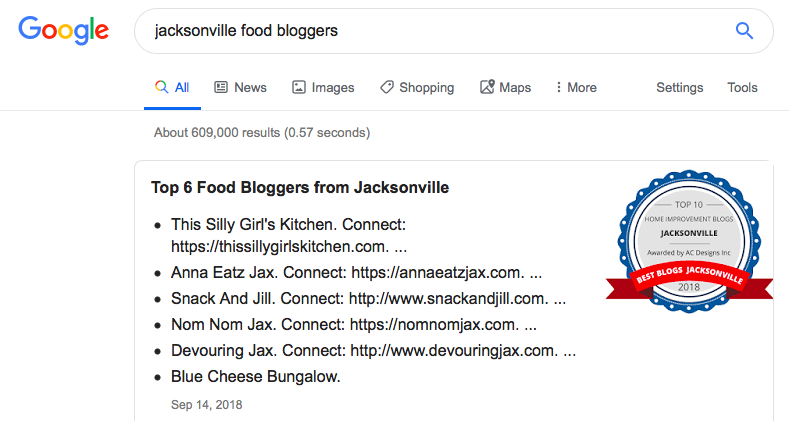
Visit their websites, see if it’s relevant, and then contact the bloggers to invite them to the restaurant. This can also direct you to their Instagram page to follow them.
On Instagram, it’s a bit more difficult, but think of different hashtags that could be relevant, click on the blogger and see how many followers they have.
- If over 1000
followers, they are a good target.
- Be sure to use your local city name to do searches
- Some examples are:
- #foodiejax
- #JacksonvilleFood
- #JaxRestaurants
- #FloridaFoodies
- #JaxReviews
- In this example, I looked up Foodie Jacksonville to see some hashtags.
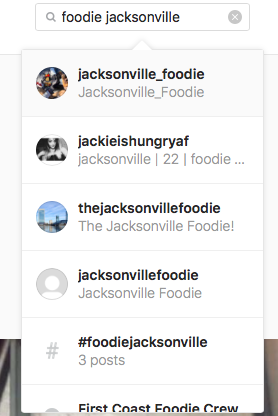
Here are the results that popped up. From here, you can click on the photo to see who posted it.
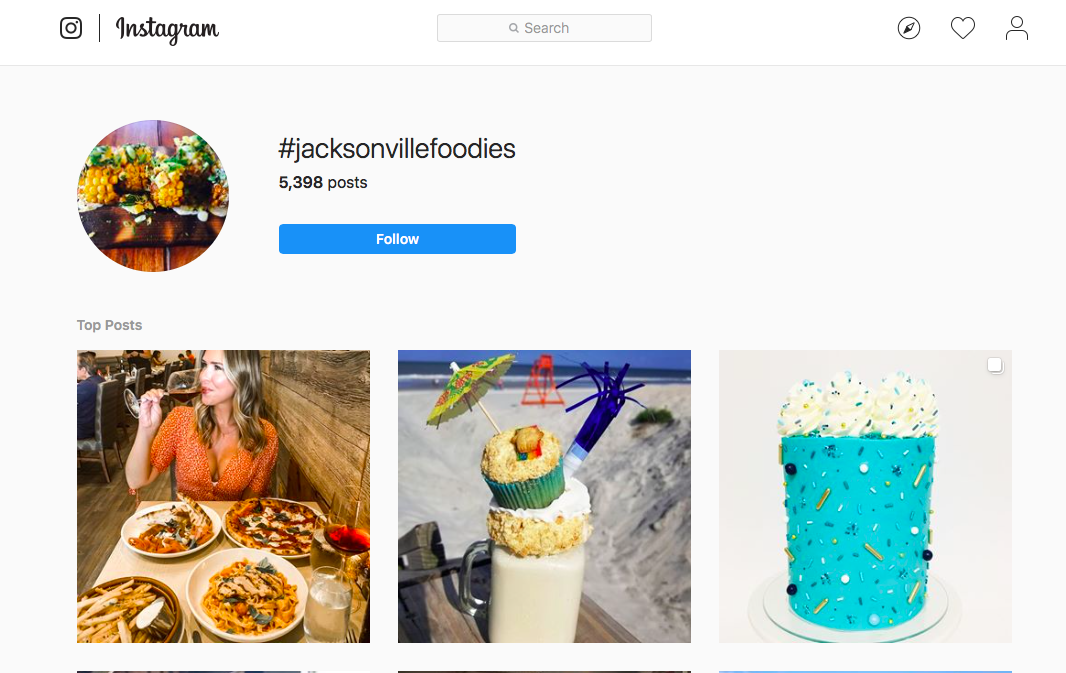
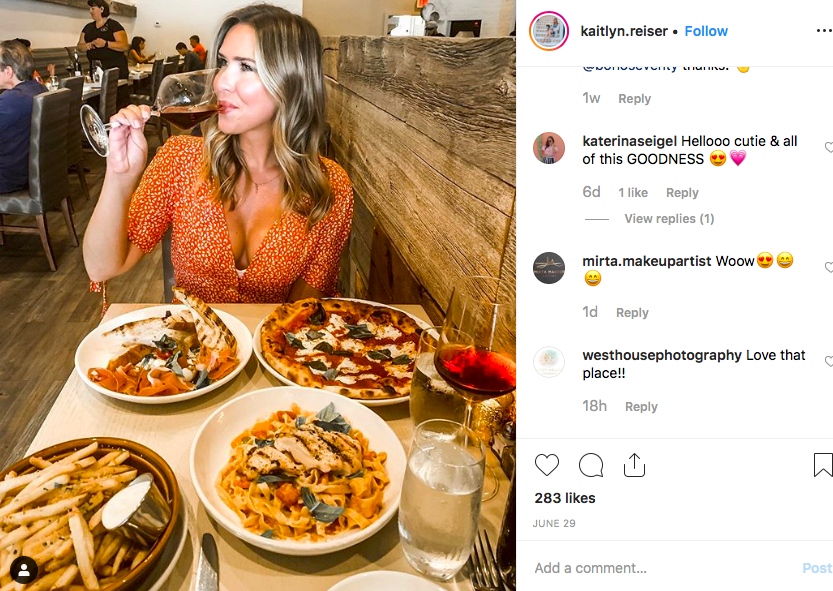
Clicking on the first photo shows Kaitlyn.Reiser. With 283 likes, she’s likely to be influential.
This would be a good person to reach out to with 2700 followers.
Example email or message about what to say:
Hi Kaitlyn,
I was looking through Jacksonville food photos on Instagram and came across your profile. Looks like you enjoy going to restaurants in the area! I’d love to invite you and a guest in to Carmine’s to have a meal on us. We offer a selection of unique pizzas, Italian fare, desserts and more with a fun and funky décor that we think would look great on your Instagram. Plus, I see you’re a soon to be bride- congrats! We offer catering and it’d be a delicious midnight snack at the reception! Please let me know if you’d be interested in joining us. We hope if you enjoy your food you could tag us on any photos you may post.
Thank you and hope to hear from you soon!
-Kathryn Broderick
Marketing Manager
- If you don’t hear back, be sure to follow up in a few weeks.
- If they do accept your invitation, be sure a manager is on
the shift to ensure an excellent experience.
- It’s recommended to ask about any dietary restrictions before the visit
- Bring them what they order, but also be sure to throw in a few other selections so they can try a few things
- Always bring dessert!
- Be sure to follow them so you can thank them if any photos or blog articles are posted. These are great to share on Facebook.
- If they do not accept your invitation, thank them and make
a note not to follow up.
- *Some bloggers may ask for payment. Depending on how large their audience is, this may be something to discuss with the Marketing Manager.