Deprecated: Creation of dynamic property WP_Term::$cat_ID is deprecated in /home/cleanpla/public_html/mk/wp-includes/category.php on line 378
Deprecated: Creation of dynamic property WP_Term::$category_count is deprecated in /home/cleanpla/public_html/mk/wp-includes/category.php on line 379
Deprecated: Creation of dynamic property WP_Term::$category_description is deprecated in /home/cleanpla/public_html/mk/wp-includes/category.php on line 380
Deprecated: Creation of dynamic property WP_Term::$cat_name is deprecated in /home/cleanpla/public_html/mk/wp-includes/category.php on line 381
Deprecated: Creation of dynamic property WP_Term::$category_nicename is deprecated in /home/cleanpla/public_html/mk/wp-includes/category.php on line 382
Deprecated: Creation of dynamic property WP_Term::$category_parent is deprecated in /home/cleanpla/public_html/mk/wp-includes/category.php on line 383
https://mk.cleanplate.us/community/connecting-with-local-schools/
Deprecated: Creation of dynamic property WP_Term::$cat_ID is deprecated in /home/cleanpla/public_html/mk/wp-includes/category.php on line 378
Deprecated: Creation of dynamic property WP_Term::$category_count is deprecated in /home/cleanpla/public_html/mk/wp-includes/category.php on line 379
Deprecated: Creation of dynamic property WP_Term::$category_description is deprecated in /home/cleanpla/public_html/mk/wp-includes/category.php on line 380
Deprecated: Creation of dynamic property WP_Term::$cat_name is deprecated in /home/cleanpla/public_html/mk/wp-includes/category.php on line 381
Deprecated: Creation of dynamic property WP_Term::$category_nicename is deprecated in /home/cleanpla/public_html/mk/wp-includes/category.php on line 382
Deprecated: Creation of dynamic property WP_Term::$category_parent is deprecated in /home/cleanpla/public_html/mk/wp-includes/category.php on line 383
Deprecated: Creation of dynamic property WP_Term::$category_count is deprecated in /home/cleanpla/public_html/mk/wp-includes/category.php on line 379
Deprecated: Creation of dynamic property WP_Term::$category_description is deprecated in /home/cleanpla/public_html/mk/wp-includes/category.php on line 380
Deprecated: Creation of dynamic property WP_Term::$cat_name is deprecated in /home/cleanpla/public_html/mk/wp-includes/category.php on line 381
Deprecated: Creation of dynamic property WP_Term::$category_nicename is deprecated in /home/cleanpla/public_html/mk/wp-includes/category.php on line 382
Deprecated: Creation of dynamic property WP_Term::$category_parent is deprecated in /home/cleanpla/public_html/mk/wp-includes/category.php on line 383
Why? To become a part of the local community and connect with new guests. Families who attend these schools will get to know and trust your brand and use your restaurant as a “go-to” for food. This will increase sales and create loyal fans. Estimated Time to Execute: Recommended 30 minutes per week visiting or … ]]>
To become a part of the local community and connect with new guests. Families who attend these schools will get to know and trust your brand and use your restaurant as a “go-to” for food. This will increase sales and create loyal fans.
Estimated Time to Execute:
Recommended 30 minutes per week visiting or following up with at least one school, but will vary depending on amount of schools within a 3-5 mile radius.
What:
- There are several ways to connect with schools that are mutually beneficial to the restaurant and the school.
- These include:
- Fundraising within your restaurant where a certain percentage of sales on a specified day goes back to the organization (recommended 15-25%)
- Donations of food or gift cards for school events to get awareness to students and families
- Team dinners for sports team or other organizations (theater, marching band, choir, etc), likely partially donated or discounted. These can be within the restaurant or off-site
- Sponsorship or participating in school events (sometimes schools have restaurants come to pass out samples, be a vendor for an after prom party, etc).
- Specifying a certain “Appreciation Week” for that school where teachers and staff receive an offer in-restaurant
Tools Needed:
- Computer/Internet
- “How Can You Partner With Us” sheets
- Menus
- Catering Menus (if applicable)
- Food samples (if applicable)
Research Needed Prior to Execution:
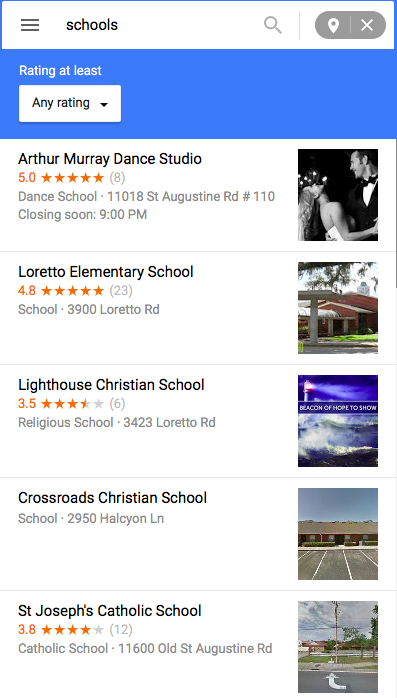
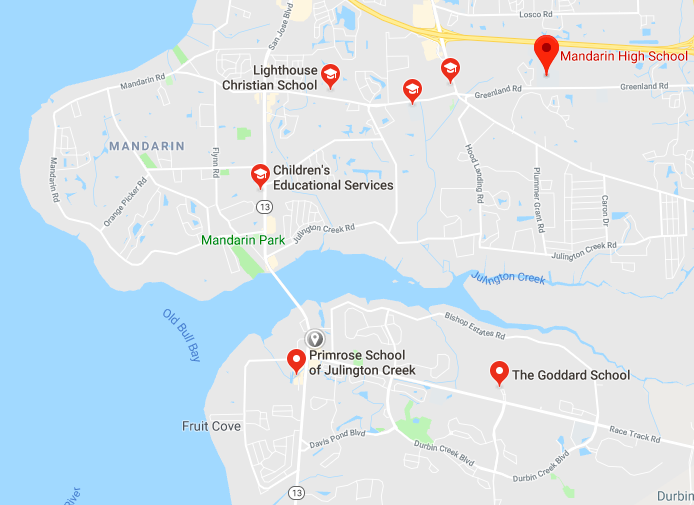
- Go on Google Maps and put in the address of your restaurant. Click the “Search Nearby” function and type in “schools”. This will populate a list of schools nearby. Write down the list of schools with their address, phone number and website.
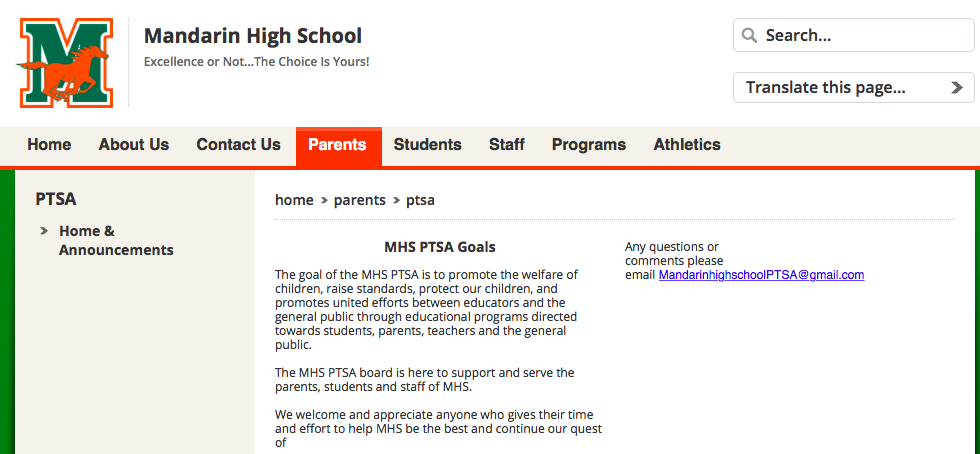
- For elementary schools, look for the link to the PTA or PTO on their website. Sometimes this is under a “Parents” tab or “PTA” tab.
- For middle schools or high schools, also look for the PTA or PTO link on their website. Additionally, look for the Athletics tab and any other clubs/organizations where you can find contact information.
Execution:
- It is preferable to visit a school in-person to speak with
the office administration.
- Be sure to visit the office before 2:30pm when staff is still there
- Bring with several “How You Can Partner With Us” sheets, multiple menus and food samples if applicable.
- Walk into the school office, introduce yourself and where you work (talk slowly), and let them know you are interested in partnering with their school this school year.
- Discuss a few of the options available and see if they work with other local restaurants in any way.
- Get contact information for the best person to follow up with (this may be the PTA instead of the school directly).
- Leave some menus/food samples and thank them for their time. If you offer catering, remind them you deliver for staff meetings, holiday parties or other events.
- Once back at the restaurant, reach out to the contact person to discuss options further.
- If you are unable to visit a school in person, refer to the example email below to send to emails found on their website.
Tips:
- Many schools
set up all fundraisers at the beginning of the year- don’t miss out being one
of the options!
- If there is no opportunity available right now, don’t be afraid to follow up again in a month.
- Some PTA’s have monthly meetings- offer to bring food to the next meeting to discuss partnership opportunities.
Example Email:
Hello,
My name is Kathryn Broderick and I’m the Marketing Manager for Moon Dog Pie House in Port Orange. We are looking for ways to further connect in our community and would love to work with the Loretto Elementary School PTA.
Since the school year is coming up, I thought it would be a good time to have a quick call and see how we can partner with you. We offer a few different options for partnership outlined below (I’ve also attached a letter with a bit more information). These options include:
- Fundraiser inside our restaurant where a percentage of sales for one evening goes back to your organization
- Participating in your events
- Food donations
- Gift card donations
- Or anything else!
Please contact me so we can start planning for the school year ahead. I think a fundraiser would be a great option to raise funds for you and introduce families to our restaurant. If it would be helpful, I’d love to come to the next PTA meeting with some pizzas to have your group try the food and talk further.
My email is Kathryn.broderick@cleanplaterestaurants.com and phone is 773-750-2887. I look forward to hearing from you!
-Kathryn Broderick
]]>Deprecated: Creation of dynamic property WP_Term::$cat_ID is deprecated in /home/cleanpla/public_html/mk/wp-includes/category.php on line 378
Deprecated: Creation of dynamic property WP_Term::$category_count is deprecated in /home/cleanpla/public_html/mk/wp-includes/category.php on line 379
Deprecated: Creation of dynamic property WP_Term::$category_description is deprecated in /home/cleanpla/public_html/mk/wp-includes/category.php on line 380
Deprecated: Creation of dynamic property WP_Term::$cat_name is deprecated in /home/cleanpla/public_html/mk/wp-includes/category.php on line 381
Deprecated: Creation of dynamic property WP_Term::$category_nicename is deprecated in /home/cleanpla/public_html/mk/wp-includes/category.php on line 382
Deprecated: Creation of dynamic property WP_Term::$category_parent is deprecated in /home/cleanpla/public_html/mk/wp-includes/category.php on line 383
https://mk.cleanplate.us/community/partnering-with-non-profit-organizations/
Deprecated: Creation of dynamic property WP_Term::$cat_ID is deprecated in /home/cleanpla/public_html/mk/wp-includes/category.php on line 378
Deprecated: Creation of dynamic property WP_Term::$category_count is deprecated in /home/cleanpla/public_html/mk/wp-includes/category.php on line 379
Deprecated: Creation of dynamic property WP_Term::$category_description is deprecated in /home/cleanpla/public_html/mk/wp-includes/category.php on line 380
Deprecated: Creation of dynamic property WP_Term::$cat_name is deprecated in /home/cleanpla/public_html/mk/wp-includes/category.php on line 381
Deprecated: Creation of dynamic property WP_Term::$category_nicename is deprecated in /home/cleanpla/public_html/mk/wp-includes/category.php on line 382
Deprecated: Creation of dynamic property WP_Term::$category_parent is deprecated in /home/cleanpla/public_html/mk/wp-includes/category.php on line 383
Deprecated: Creation of dynamic property WP_Term::$category_count is deprecated in /home/cleanpla/public_html/mk/wp-includes/category.php on line 379
Deprecated: Creation of dynamic property WP_Term::$category_description is deprecated in /home/cleanpla/public_html/mk/wp-includes/category.php on line 380
Deprecated: Creation of dynamic property WP_Term::$cat_name is deprecated in /home/cleanpla/public_html/mk/wp-includes/category.php on line 381
Deprecated: Creation of dynamic property WP_Term::$category_nicename is deprecated in /home/cleanpla/public_html/mk/wp-includes/category.php on line 382
Deprecated: Creation of dynamic property WP_Term::$category_parent is deprecated in /home/cleanpla/public_html/mk/wp-includes/category.php on line 383
Why? To be a strong part of your community and a partner that gives back to help local organizations. Guests feel strong connections to local groups and often will be loyal to businesses that support them, which leads to increased visits and sales. Giving back can also lead to increased exposure and press in the … ]]>
To be a strong part of your community and a partner that gives back to help local organizations. Guests feel strong connections to local groups and often will be loyal to businesses that support them, which leads to increased visits and sales. Giving back can also lead to increased exposure and press in the area.
Estimated Time to Execute:
Varies depending on the partnership and giving back commitment. Some research time may be needed as well as a 30-60 minute initial meeting.
What makes a good partner:
- Look for a group that you and your team can feel passionate about helping. The more excited you are, the more excited your guests will feel.
- Make sure it is local and near your restaurant. Families who attend an elementary school a few blocks away have more stake than the “American Lung Association- Florida” that is a great cause, but not as personally connected to your community.
- Ensure the partner has a good guest reach with social media presence, email blasts, meeting attendance, etc. The more word they can get out about the restaurant partnership, the better for both of you.
- Choose a partner that you can work with multiple times over the year. This should not be the only time we work with them (catering for events, silent auction donations, sponsorship, etc).
- 501c3 status as a non-profit
Tools Needed:
- Internet time to research local organizations
Research Needed Prior to Execution:
- Ask your team if there are any local causes they feel passionate about. This is a great starting point if you do not have any previous partners you’d like to work with again.
- If you’re starting from scratch, look through previous donation requests and see if there are any groups you think would be good to work with.
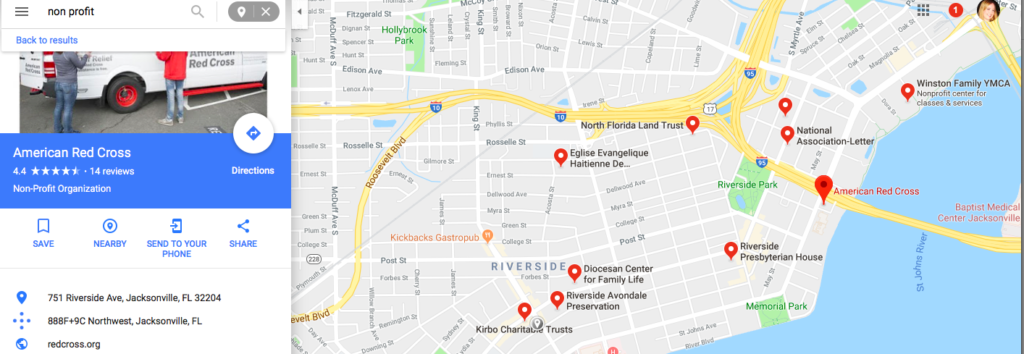
- Use Google Maps to look for non-profit organization in your area if looking for more ideas. Use the ‘Search Nearby” function for non-profit.
- Also consider local schools, libraries, fire stations, animal shelters etc as local partners.
Execution:
- Once you’ve selected an organization, approach them with
what we are doing for our fundraising for the holidays (reference the Holiday
Fundraiser Promotion document for more information.)
- Prior to selection, try to check out their website, social media, etc to ensure they will have a good reach.
- Try to avoid any groups that may seem controversial in any way- we want all guests to feel comfortable donating to the group.
- Ask if they’d be interested in being our partner for this December after outlying the program.
- If interested, get the best contact information for the person who you will be working with going forward, and aim to set up a meeting (either in-person or by phone) to discuss promotional activities for both of you.
- When you meet or discuss further, be sure to collect their:
- Logo
- Website
- Social media sites/handles
- Any photos they will let us use for promotion
- Any restrictions or language they’d like us to use for promotion
- Details for payment after promotion ends
- Let them know how we will promote their organization via:
- In-restaurant promotion with desserts
- Server mentions
- Email blast (contact Kathryn for numbers if needed)
- Social media
- Ask about other opportunities for this season (speaking at a meeting, press release, donating desserts to a meeting, etc) as well as through 2019.
- Thank them and get excited for a fun holiday promotion!
Deprecated: Creation of dynamic property WP_Term::$cat_ID is deprecated in /home/cleanpla/public_html/mk/wp-includes/category.php on line 378
Deprecated: Creation of dynamic property WP_Term::$category_count is deprecated in /home/cleanpla/public_html/mk/wp-includes/category.php on line 379
Deprecated: Creation of dynamic property WP_Term::$category_description is deprecated in /home/cleanpla/public_html/mk/wp-includes/category.php on line 380
Deprecated: Creation of dynamic property WP_Term::$cat_name is deprecated in /home/cleanpla/public_html/mk/wp-includes/category.php on line 381
Deprecated: Creation of dynamic property WP_Term::$category_nicename is deprecated in /home/cleanpla/public_html/mk/wp-includes/category.php on line 382
Deprecated: Creation of dynamic property WP_Term::$category_parent is deprecated in /home/cleanpla/public_html/mk/wp-includes/category.php on line 383
https://mk.cleanplate.us/community/partnering-with-a-local-blood-center/
Deprecated: Creation of dynamic property WP_Term::$cat_ID is deprecated in /home/cleanpla/public_html/mk/wp-includes/category.php on line 378
Deprecated: Creation of dynamic property WP_Term::$category_count is deprecated in /home/cleanpla/public_html/mk/wp-includes/category.php on line 379
Deprecated: Creation of dynamic property WP_Term::$category_description is deprecated in /home/cleanpla/public_html/mk/wp-includes/category.php on line 380
Deprecated: Creation of dynamic property WP_Term::$cat_name is deprecated in /home/cleanpla/public_html/mk/wp-includes/category.php on line 381
Deprecated: Creation of dynamic property WP_Term::$category_nicename is deprecated in /home/cleanpla/public_html/mk/wp-includes/category.php on line 382
Deprecated: Creation of dynamic property WP_Term::$category_parent is deprecated in /home/cleanpla/public_html/mk/wp-includes/category.php on line 383
Deprecated: Creation of dynamic property WP_Term::$category_count is deprecated in /home/cleanpla/public_html/mk/wp-includes/category.php on line 379
Deprecated: Creation of dynamic property WP_Term::$category_description is deprecated in /home/cleanpla/public_html/mk/wp-includes/category.php on line 380
Deprecated: Creation of dynamic property WP_Term::$cat_name is deprecated in /home/cleanpla/public_html/mk/wp-includes/category.php on line 381
Deprecated: Creation of dynamic property WP_Term::$category_nicename is deprecated in /home/cleanpla/public_html/mk/wp-includes/category.php on line 382
Deprecated: Creation of dynamic property WP_Term::$category_parent is deprecated in /home/cleanpla/public_html/mk/wp-includes/category.php on line 383
Why? Blood Centers are always in need of ways to attract more donors to help save lives. Your restaurant can offer an incentive and/or host a mobile blood drive to help increase blood donations in your community. This not only helps the community, but will also drive additional traffic to your location from coupon redemptions … ]]>
Blood Centers are always in need of ways to attract more donors to help save lives. Your restaurant can offer an incentive and/or host a mobile blood drive to help increase blood donations in your community. This not only helps the community, but will also drive additional traffic to your location from coupon redemptions from donors and increased advertising reach from the partner.
Estimated Time to Execute:
~20 minutes to research and send contact email to blood center. Communication as needed with partner to figure out logistics. Blood drive itself may last ~4 hours.
Execution:
- You will need to contact your local blood center (should be
within 5 miles of your location) and let them know your interest in partnering
with them. Target time is during the month of July.
- Simply Google Blood Center + Your City or go to Google Maps, put in the address of your restaurant, then do “Search Nearby” for Blood Center.
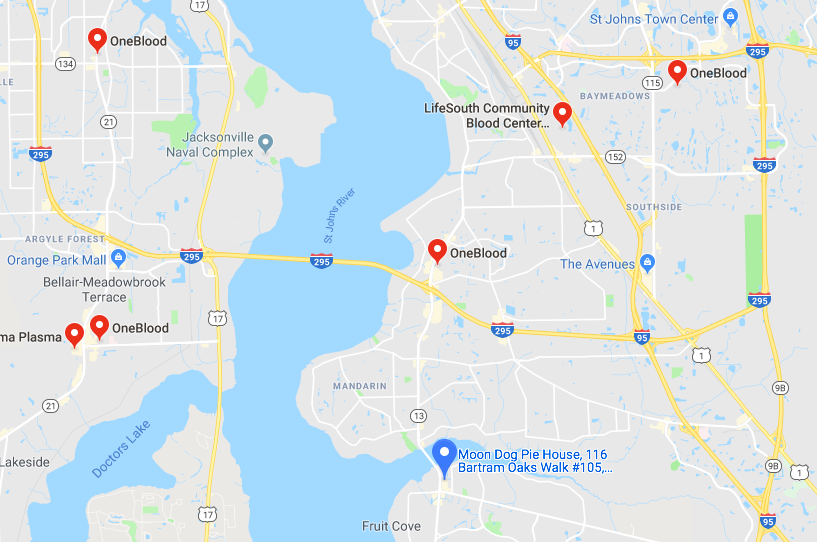
- There are two main ways to partner, but if your blood center
has other ideas, be creative!
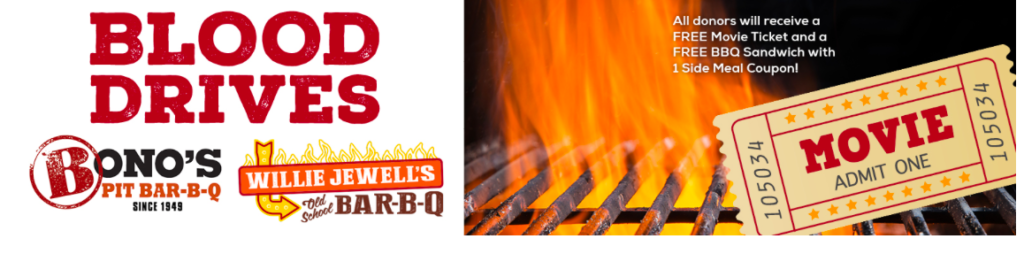
- Offering an incentive for a blood drive
- This can be an incentive for a day, week or the entire
month! Depending on the amount of coupons distributed to their donors, the more
advertising we should get.
- Example: If providing 1000 $5 gift cards for a week of
incentives ($5000 value), we should ask for promotion such as Facebook
mentions, an email blast and text message blast to donors.
- Incentives can range per restaurant, but should be somewhere in the $5-$10 value range. Gift cards, bonus cards or a free item like an appetizer are good options.
- If you have a sister restaurant nearby, you can do two coupons and work together for the same organization.
- Example: If providing 1000 $5 gift cards for a week of
incentives ($5000 value), we should ask for promotion such as Facebook
mentions, an email blast and text message blast to donors.
- This can be an incentive for a day, week or the entire
month! Depending on the amount of coupons distributed to their donors, the more
advertising we should get.
- Hosting a mobile blood drive
- Offering an incentive for a blood drive
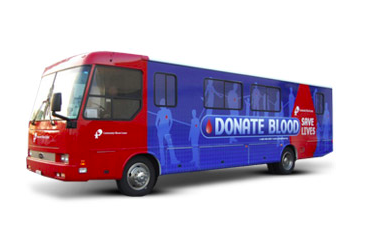
- This option may work well for those restaurants with a parking lot. A mobile drive will be scheduled for a specified date and time at your location with a bus in your lot.
- You can also offer an incentive for donors to use immediately at your restaurant (ie. Free slice of pizza after you donate!) or for a future time.
Things to remember:
- Before
committing to any partnership, you must discuss terms with Kathryn. Depending
on what the partner is looking for, we may need to do some analysis on impact
to financials.
- Keep it local. The closer the location, the more likely you’ll have exposure to potential new guests.
- If it’s a larger donation, don’t be afraid to ask what they will do to advertise the partnership. We will advertise on our end, but it should also be promoted to their donor base in a variety of ways.
- Be generous! The more attractive the offer, the better it will work for both of you.

Example Email:
Hello,
My name is Kathryn Broderick and I’m the Marketing Manager for Monterey Grill in Port Orange. We are looking for ways to further connect in our community and know that July can be a tough month for blood donations. We wanted to see if we could partner with you to offer an incentive to your donors during a specified time in July.
We are flexible on the details, but are initially thinking providing you with 500 coupons for a free appetizer to our location for your donors to come enjoy. Depending on your needs, we could also host a mobile blood drive at our restaurant.
I’d love to discuss further and see how we can work with you and become a partner of OneBlood. Please contact me at 773-750-2887 or Kathryn.broderick@cleanplaterestaurants.com .
I look forward to hearing from you!
-Kathryn Broderick
]]>Deprecated: Creation of dynamic property WP_Term::$cat_ID is deprecated in /home/cleanpla/public_html/mk/wp-includes/category.php on line 378
Deprecated: Creation of dynamic property WP_Term::$category_count is deprecated in /home/cleanpla/public_html/mk/wp-includes/category.php on line 379
Deprecated: Creation of dynamic property WP_Term::$category_description is deprecated in /home/cleanpla/public_html/mk/wp-includes/category.php on line 380
Deprecated: Creation of dynamic property WP_Term::$cat_name is deprecated in /home/cleanpla/public_html/mk/wp-includes/category.php on line 381
Deprecated: Creation of dynamic property WP_Term::$category_nicename is deprecated in /home/cleanpla/public_html/mk/wp-includes/category.php on line 382
Deprecated: Creation of dynamic property WP_Term::$category_parent is deprecated in /home/cleanpla/public_html/mk/wp-includes/category.php on line 383
https://mk.cleanplate.us/community/cultivating-business-relationships-for-referrals/
Deprecated: Creation of dynamic property WP_Term::$cat_ID is deprecated in /home/cleanpla/public_html/mk/wp-includes/category.php on line 378
Deprecated: Creation of dynamic property WP_Term::$category_count is deprecated in /home/cleanpla/public_html/mk/wp-includes/category.php on line 379
Deprecated: Creation of dynamic property WP_Term::$category_description is deprecated in /home/cleanpla/public_html/mk/wp-includes/category.php on line 380
Deprecated: Creation of dynamic property WP_Term::$cat_name is deprecated in /home/cleanpla/public_html/mk/wp-includes/category.php on line 381
Deprecated: Creation of dynamic property WP_Term::$category_nicename is deprecated in /home/cleanpla/public_html/mk/wp-includes/category.php on line 382
Deprecated: Creation of dynamic property WP_Term::$category_parent is deprecated in /home/cleanpla/public_html/mk/wp-includes/category.php on line 383
Deprecated: Creation of dynamic property WP_Term::$category_count is deprecated in /home/cleanpla/public_html/mk/wp-includes/category.php on line 379
Deprecated: Creation of dynamic property WP_Term::$category_description is deprecated in /home/cleanpla/public_html/mk/wp-includes/category.php on line 380
Deprecated: Creation of dynamic property WP_Term::$cat_name is deprecated in /home/cleanpla/public_html/mk/wp-includes/category.php on line 381
Deprecated: Creation of dynamic property WP_Term::$category_nicename is deprecated in /home/cleanpla/public_html/mk/wp-includes/category.php on line 382
Deprecated: Creation of dynamic property WP_Term::$category_parent is deprecated in /home/cleanpla/public_html/mk/wp-includes/category.php on line 383
Why? To build up your reputation and trust with within the hospitality community so they recommend guests to visit your restaurant over the competition. Estimated Time to Execute: Recommended weekly interaction and follow up. Executing tastings or private events will take additional time. What: Word of mouth and referrals can be one of the most …
Continue reading "Cultivating Business Relationships for Referrals"
]]>To build up your reputation and trust with within the hospitality community so they recommend guests to visit your restaurant over the competition.
Estimated Time to Execute:
Recommended weekly interaction and follow up. Executing tastings or private events will take additional time.
What:
- Word of mouth and referrals can be one of the most important ways to capture new or travelling guests. It is vital to have relationships with those businesses that can send people to your restaurant
- Types of businesses include:
- Hotels
- Specifically front desk staff, concierge, manager
- Tourism/welcome centers
- Convention centers
- Office building concierge
- Event spaces (catering)
- Wedding planners (banquet space, catering)
- Kids party places (Build-a-Bear, gym, etc)
- Hotels
Tools Needed:
- Business cards
- Referral coupon cards
- “Goodie” bag or food to leave
- Tasting invite (if applicable)
- Menus
- Catering menus (if applicable)
Research Needed Prior to Execution:
- Know what businesses are in your community that may send
referrals. You can do a search on Google Maps by name or type of place.
- Type in the name of your restaurant for a starting point on Google Maps.
- Click “Nearby” with the blue circle next to Save.
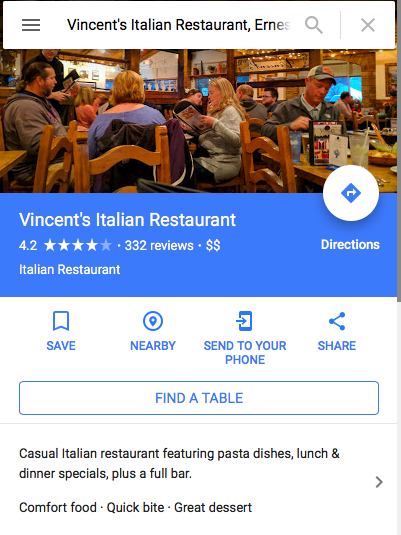
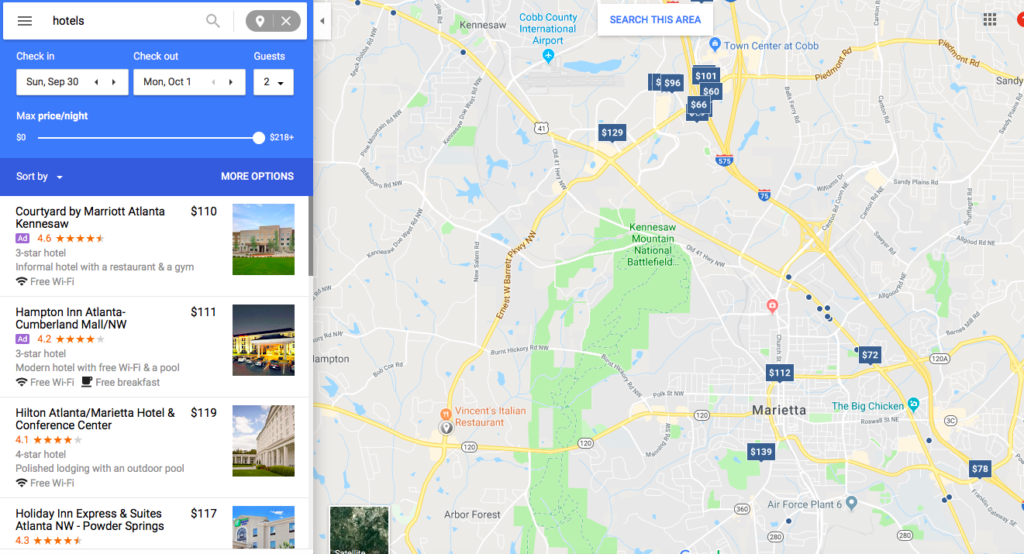
- Then, type is the type of business you are looking for and Enter to search.
- Each blue
price on the map is a different hotel or you can scroll down the list on the
right. Create a list for yourself of which ones you will visit. (Excel sheet
for tracking is separate document attached).
- Do this search multiple times for each type of business you’d like to try and connect with.
Execution:
- After you have your list of which businesses will be your target, it’s time to visit them. Give yourself ~10 minutes per business with driving time. Some may go quick, others may invite you to chat for awhile.
- Walk up to the person at the front, be genuine and confident, speak slowly, and explain who you are and what you’re there for.
- Example scenario. Visiting a Holiday Inn a mile down the
road for the first time.
- Walk to the
front desk. Approach if they are not busy, wait until they are finished talking
to their guest if not.
- “Hi, I’m Kathryn. I’m the Marketing Manager from Vincent’s Italian on Ernest Barrett Parkway about a mile down, right by Home Depot. How are you today?
- Front desk staff: “Great, thanks.”
- “Are you familiar with Vincent’s? Have you ever been in to eat?”
- “I’ve seen it, never been in.”
- “Oh, great. Well, I brought over a few slices of cake for you and your co-workers to try today. We’re known for our authentic Italian and have a variety of items for lunch of dinner to choose from. Here’s our menu.”
- “Oh wow, thanks! I’ll have to take a look at this.”
- “Do guests ever ask you where to eat when they’re staying?”
- “Oh yeah, all the time.”
- “We’d love to be an option. I brought by some coupons if you’d give them to guests looking for a restaurant to visit. There’s a spot on the back to put your name as the referral, if we get 10 back, I’ll bring you over a gift card as a thank you. Same with the other front desk staff. We really appreciate when our neighbors can recommend us to their guests.”
- “I’ll definitely let them know. That cake looks delicious.”
- “It is, believe me! What was your name again?
- “I’m Jenny, I work here on weekdays.”
- “So nice to meet you, Jenny. Could I grab your business card? Is the manager in? I’d love to introduce myself to him or her as well.”
- Walk to the
front desk. Approach if they are not busy, wait until they are finished talking
to their guest if not.
- Example scenario #2: Marriott you’ve been to before and used
to see some referral cards,but haven’t in awhile.
- Walk in, it is
a concierge you don’t recognize at the desk.
- Hi, my name is Kathryn, I’m the Marketing Manager at Vincent’s Italian on Ernest Barrett Parkway. We’ve worked with the other concierge, John, before on some referrals to our restaurant. Are you new to the hotel?
- Yes, we’ve recently had a manager change and there’s some new staff. I’m Brian.
- Hi Brian, nice to meet you. Have you seen the referral cards we’ve brought in for your guests?
- No, I haven’t.
- Here’s some for you. It’s a $5 off coupon for them and if you write your name and I get five back, I’ll bring over a gift card as a thank you. We’d love if you could give them out ot guests looking for a restaurant nearby. Have you been in to Vincent’s before?
- No, I’m not familiar.
- I’d like to invite you and some of the new staff over for a complimentary lunch to try out our food and see what we’re all about. Could I get your business card so we can set something up?
- Walk in, it is
a concierge you don’t recognize at the desk.
- Don’t be discouraged!
- It’s all about finding the people who ARE interested and
excited and continuing to follow up with them.
- Once you get a few referrals back, even if it’s less than the number you told them, bring over a gift card and maybe a few goodies as a thank you. Once they know you’re good to your word, they’ll keep it up.
- Be sure to continuously bring over referral cards. It gives you facetime with those helping you out, and they may run out quickly if it’s a busy time of year.
- Don’t be afraid to be persistent! And be generous! Bring over some food, invite them to lunch on you, host a special tasting dinner for multiple industry people on the same night.
- People will refer you when they know the product they are referring (trying the food) and feel loyal (consistent generosity and appreciation).
- If it’s been a few months,follow up! There is turnover and you may not know when new opportunity is waiting for you.
- Make weekly visits to current and potential new referrers part of your weekly schedule. Even a phone call to check in on how many cards they have left can be quick and a good reminder.
Deprecated: Creation of dynamic property WP_Term::$cat_ID is deprecated in /home/cleanpla/public_html/mk/wp-includes/category.php on line 378
Deprecated: Creation of dynamic property WP_Term::$category_count is deprecated in /home/cleanpla/public_html/mk/wp-includes/category.php on line 379
Deprecated: Creation of dynamic property WP_Term::$category_description is deprecated in /home/cleanpla/public_html/mk/wp-includes/category.php on line 380
Deprecated: Creation of dynamic property WP_Term::$cat_name is deprecated in /home/cleanpla/public_html/mk/wp-includes/category.php on line 381
Deprecated: Creation of dynamic property WP_Term::$category_nicename is deprecated in /home/cleanpla/public_html/mk/wp-includes/category.php on line 382
Deprecated: Creation of dynamic property WP_Term::$category_parent is deprecated in /home/cleanpla/public_html/mk/wp-includes/category.php on line 383
https://mk.cleanplate.us/community/marketing-during-the-holidays/
Deprecated: Creation of dynamic property WP_Term::$cat_ID is deprecated in /home/cleanpla/public_html/mk/wp-includes/category.php on line 378
Deprecated: Creation of dynamic property WP_Term::$category_count is deprecated in /home/cleanpla/public_html/mk/wp-includes/category.php on line 379
Deprecated: Creation of dynamic property WP_Term::$category_description is deprecated in /home/cleanpla/public_html/mk/wp-includes/category.php on line 380
Deprecated: Creation of dynamic property WP_Term::$cat_name is deprecated in /home/cleanpla/public_html/mk/wp-includes/category.php on line 381
Deprecated: Creation of dynamic property WP_Term::$category_nicename is deprecated in /home/cleanpla/public_html/mk/wp-includes/category.php on line 382
Deprecated: Creation of dynamic property WP_Term::$category_parent is deprecated in /home/cleanpla/public_html/mk/wp-includes/category.php on line 383
Deprecated: Creation of dynamic property WP_Term::$category_count is deprecated in /home/cleanpla/public_html/mk/wp-includes/category.php on line 379
Deprecated: Creation of dynamic property WP_Term::$category_description is deprecated in /home/cleanpla/public_html/mk/wp-includes/category.php on line 380
Deprecated: Creation of dynamic property WP_Term::$cat_name is deprecated in /home/cleanpla/public_html/mk/wp-includes/category.php on line 381
Deprecated: Creation of dynamic property WP_Term::$category_nicename is deprecated in /home/cleanpla/public_html/mk/wp-includes/category.php on line 382
Deprecated: Creation of dynamic property WP_Term::$category_parent is deprecated in /home/cleanpla/public_html/mk/wp-includes/category.php on line 383
Why? The holidays are a great time to connect with your community and guests are feeling warm and happy about the time of year. They are also out and about shopping and spending more freely than other times of the year, perhaps visiting with out-of-town guests and want to show them the area. Marketing during … ]]>
The holidays are a great time to connect with your community and guests are feeling warm and happy about the time of year. They are also out and about shopping and spending more freely than other times of the year, perhaps visiting with out-of-town guests and want to show them the area. Marketing during this time and partnering with local events and organizations has a “festive” feeling and shows we give back to the community.
What?
Look for events in your area where we can get our food, name or gift card donation out into the community. Many groups put on specific holiday events and are looking for businesses to participate. Look for ways to promote dining in, catering, holiday parties or gift card sales.
Possible Partners:
- Park District
- Churches
- Schools
- Craft fairs, holiday bizaars
- Teacher holiday parties
- Your city tourism (Visit Raleigh, Visit Jacksonville, etc)
- Main Street Association
- Ice skating rinks
- Zoo
- Malls
- Santa sometimes gives out goodies after the visit including coupons for businesses
- Charity partner
- Ask your charity partner for December if they have any holiday events we could work with them further on
Types of involvement:
- Table at event with samples
- Coupons or collateral for distribution
- Donation of food or gift card
- Be sure to get your logo and any relevant information to their audience.
- Ask to be included on a social media post, newsletter mention, banner at event, etc
- Cross-promotional marketing
- We’ll put up a poster and post on social media about the event , they do the same about us
Opportunities for social media posts:
- Black Friday (11/23)
- Catering
- Morning shoppers
- Small Business Saturday (11/24)
- Shop local, promote gift cards
- Hanukkah (12/2-12/10)
- Week before Christmas (12/17-12/22)
- Last minute gift idea for gift cards
- Catering at retailers
- Holiday hours (if applicable, 12/24, 12/25, 12/31, 1/1)
- New Year’s Day (1/1)
- Promote brunching at the restaurant
Deprecated: Creation of dynamic property WP_Term::$cat_ID is deprecated in /home/cleanpla/public_html/mk/wp-includes/category.php on line 378
Deprecated: Creation of dynamic property WP_Term::$category_count is deprecated in /home/cleanpla/public_html/mk/wp-includes/category.php on line 379
Deprecated: Creation of dynamic property WP_Term::$category_description is deprecated in /home/cleanpla/public_html/mk/wp-includes/category.php on line 380
Deprecated: Creation of dynamic property WP_Term::$cat_name is deprecated in /home/cleanpla/public_html/mk/wp-includes/category.php on line 381
Deprecated: Creation of dynamic property WP_Term::$category_nicename is deprecated in /home/cleanpla/public_html/mk/wp-includes/category.php on line 382
Deprecated: Creation of dynamic property WP_Term::$category_parent is deprecated in /home/cleanpla/public_html/mk/wp-includes/category.php on line 383
https://mk.cleanplate.us/community/giving-donations/
Deprecated: Creation of dynamic property WP_Term::$cat_ID is deprecated in /home/cleanpla/public_html/mk/wp-includes/category.php on line 378
Deprecated: Creation of dynamic property WP_Term::$category_count is deprecated in /home/cleanpla/public_html/mk/wp-includes/category.php on line 379
Deprecated: Creation of dynamic property WP_Term::$category_description is deprecated in /home/cleanpla/public_html/mk/wp-includes/category.php on line 380
Deprecated: Creation of dynamic property WP_Term::$cat_name is deprecated in /home/cleanpla/public_html/mk/wp-includes/category.php on line 381
Deprecated: Creation of dynamic property WP_Term::$category_nicename is deprecated in /home/cleanpla/public_html/mk/wp-includes/category.php on line 382
Deprecated: Creation of dynamic property WP_Term::$category_parent is deprecated in /home/cleanpla/public_html/mk/wp-includes/category.php on line 383
Deprecated: Creation of dynamic property WP_Term::$category_count is deprecated in /home/cleanpla/public_html/mk/wp-includes/category.php on line 379
Deprecated: Creation of dynamic property WP_Term::$category_description is deprecated in /home/cleanpla/public_html/mk/wp-includes/category.php on line 380
Deprecated: Creation of dynamic property WP_Term::$cat_name is deprecated in /home/cleanpla/public_html/mk/wp-includes/category.php on line 381
Deprecated: Creation of dynamic property WP_Term::$category_nicename is deprecated in /home/cleanpla/public_html/mk/wp-includes/category.php on line 382
Deprecated: Creation of dynamic property WP_Term::$category_parent is deprecated in /home/cleanpla/public_html/mk/wp-includes/category.php on line 383
Why? To give back to your community partners as well as have another avenue to get your brand name outside the four walls. Estimated Time to Execute: Will vary, most will be very quick, other larger events with donating food could take more resources. What: Many non-profit and community groups need donations from businesses for … ]]>
To give back to your community partners as well as have another avenue to get your brand name outside the four walls.
Estimated Time to Execute:
Will vary, most will be very quick, other larger events with donating food could take more resources.
What:
- Many non-profit and community groups need donations from
businesses for various things such as:
- Charity event
- School fundraiser
- Raffle prizes
- Food to feed volunteers
- Raising money for a cause
- Silent auction prize
- Coupons for a goodie bag
- You can donate gift cards, swag, food or a combination of these things to help out partners.
Tools Needed:
- Business cards
- Menus
- Catering menus (if applicable)
- Gift card (if applicable)
- Food and serving supplies (if applicable)
- Time for team members to set up donation (if applicable)
Research Needed Prior to Execution:
- You will get many requests in paper form and emails for
people asking for donations. It’s important to select quality partners that you
can continue to work with, as well as have a larger reach so your brand gets
the recognition from their members.
- A few best practices when deciding who to partner with:
- They have over 1000 likes on their Facebook page (the more the better!) and offer to tag you in a post as a thank you
- They have a strong Instagram following
- They have over 200 members in their organization
- They have various ways to advertise (flyers, email, social media, posters, etc)
- They are
willing to do more with you than the original donation
- Ie. Someone comes in asking for a $50 gift card for a 5k. You ask how else you can be involved. You end up donating coupons to all the race bags, have gift cards for the top three placed, and now seen as a sponsor with logos on t-shirts, branded material and tagged on social media
- They have a nice looking website and an email that is not just a generic one
- The event is at least 30 days in advance for advertising time
- These are just a few scenarios, use your best judgement.
- Remember, it is OK to say No! If feeling bad about it, let them know you’ve hit your donation budget for the quarter
- Some partners may not be the best for a straight donation, but may be able to work with you in other ways. Ask questions to see how best you can work together.
- A few best practices when deciding who to partner with:
Execution:
- Execution will vary greatly depending on the need. Most
donation will be a gift card or gift basket of sorts.
- If giving gift cards, be sure to track how many given in a quarter/year
- These can get new guests into the restaurant but should be treated like a cash donation
- Food donations can either be dropped off or set up and served like catering to show off your restaurant’s food. Generally if you have an opportunity to do sampling, do it!
- The restaurant should always “get” something out of a
donation. Don’t be afraid to ask what that is.
- Whether a mention in a PR piece, tag on social media, or larger to having branding on all materials, any donation should be mutually beneficial to the restaurant and partner.
- Ask for an event recap once the event or partnership is over with your logo or mention so we can save it for our records.
Enjoy this way to give back, helping your community and getting your restaurant exposed to potential new guests!
]]>Deprecated: Creation of dynamic property WP_Term::$cat_ID is deprecated in /home/cleanpla/public_html/mk/wp-includes/category.php on line 378
Deprecated: Creation of dynamic property WP_Term::$category_count is deprecated in /home/cleanpla/public_html/mk/wp-includes/category.php on line 379
Deprecated: Creation of dynamic property WP_Term::$category_description is deprecated in /home/cleanpla/public_html/mk/wp-includes/category.php on line 380
Deprecated: Creation of dynamic property WP_Term::$cat_name is deprecated in /home/cleanpla/public_html/mk/wp-includes/category.php on line 381
Deprecated: Creation of dynamic property WP_Term::$category_nicename is deprecated in /home/cleanpla/public_html/mk/wp-includes/category.php on line 382
Deprecated: Creation of dynamic property WP_Term::$category_parent is deprecated in /home/cleanpla/public_html/mk/wp-includes/category.php on line 383
https://mk.cleanplate.us/community/sponsorships-and-events/
Deprecated: Creation of dynamic property WP_Term::$cat_ID is deprecated in /home/cleanpla/public_html/mk/wp-includes/category.php on line 378
Deprecated: Creation of dynamic property WP_Term::$category_count is deprecated in /home/cleanpla/public_html/mk/wp-includes/category.php on line 379
Deprecated: Creation of dynamic property WP_Term::$category_description is deprecated in /home/cleanpla/public_html/mk/wp-includes/category.php on line 380
Deprecated: Creation of dynamic property WP_Term::$cat_name is deprecated in /home/cleanpla/public_html/mk/wp-includes/category.php on line 381
Deprecated: Creation of dynamic property WP_Term::$category_nicename is deprecated in /home/cleanpla/public_html/mk/wp-includes/category.php on line 382
Deprecated: Creation of dynamic property WP_Term::$category_parent is deprecated in /home/cleanpla/public_html/mk/wp-includes/category.php on line 383
Deprecated: Creation of dynamic property WP_Term::$category_count is deprecated in /home/cleanpla/public_html/mk/wp-includes/category.php on line 379
Deprecated: Creation of dynamic property WP_Term::$category_description is deprecated in /home/cleanpla/public_html/mk/wp-includes/category.php on line 380
Deprecated: Creation of dynamic property WP_Term::$cat_name is deprecated in /home/cleanpla/public_html/mk/wp-includes/category.php on line 381
Deprecated: Creation of dynamic property WP_Term::$category_nicename is deprecated in /home/cleanpla/public_html/mk/wp-includes/category.php on line 382
Deprecated: Creation of dynamic property WP_Term::$category_parent is deprecated in /home/cleanpla/public_html/mk/wp-includes/category.php on line 383
Why? Sponsoring a local team, event or festival can help show your partnership with the community and spread awareness about your business. Estimated Time to Execute: This can vary greatly depending on the event, but most will be working with the partner in the beginning, and then any time on-site at the event. What: There … ]]>
Sponsoring a local team, event or festival can help show your partnership with the community and spread awareness about your business.
Estimated Time to Execute:
This can vary greatly depending on the event, but most will be working with the partner in the beginning, and then any time on-site at the event.
What:
- There are many things to sponsor or events to be a part of,
and it really depends on the opportunities in your community. Here are a few
examples:
- Festivals
- Community event
- Local team (little league, minor league, etc)
- Non-profit event or fundraiser
- A “Taste of”
- Sports tournaments
- Church events
- Chamber events
Tools Needed:
- Business cards
- Menus
- Catering menus (if applicable)
- Food samples (if applicable)
- Access to your high res logo (can request from Marketing Manager)
- Time for team members to participate (if applicable)
- Signage/tents (if applicable)
Research Needed Prior to Execution:
- It’s likely some groups will approach you about sponsorship
(similar to donation) or you may want to see what’s happening in your area.
- Google “events in (insert your city here)” or “local sports
teams in (insert your city here) to get an idea of what’s around.
- This can also be a good opportunity to ask your team if they are involved in any groups or events that they think would be a good fit
- Once you have a few things that target the demographic you
would like to promote to, email them and see if they have any opportunities to
get involved.
- Only contact groups that make sense for your restaurant. If it’s way in the future, not nearby, very family heavy and you are more of a bar, etc, there is no need to contact them.
- You can also visit the event website and see if there is a “Sponsorship” link to visit to fill out a form with your interest.
- Google “events in (insert your city here)” or “local sports
teams in (insert your city here) to get an idea of what’s around.
Execution:
- Execution will vary greatly depending on the sponsorship and
type of group. There may be multiple parts to a sponsorship over a period of
time you’ll need to fulfill. Some results from the sponsorship:
- Table on-site to pass out samples, menus, coupons, etc
- Logo on a t-shirt, banner, sign or other event collateral
- Mentions during the event
- Catering at the event or food for staff
- A blurb in a newsletter or email blast
- Mention on social media
- Materials in a goodie bag
- Whatever else works for you and the partner!
- A few things to note:
- Sponsorships
generally cost money. These costs MUST be approved by your multi-unit leader
and Marketing Manager.
- The sponsorship may also be in trade for food. Please also make sure this is approved by your MUL.
- Don’t be afraid to ask for something not listed on a sponsorship. Generally the event or group has a few standard inclusions, but if your restaurant has catering, event space or something special that can benefit the event, let them know!
- Make sure it is mutually beneficial. We are supporting the group/event, but also should get good promotion and even in some cases direct sales, from the sponsorship or event.
- If on-site or having artwork on-site, ensure it is either approved by the Marketing Manager or you ask for what’s needed. We want to make sure we look professional and at our best!
- Sponsorships
generally cost money. These costs MUST be approved by your multi-unit leader
and Marketing Manager.
- Here’s a few examples of a sponsorship in action:
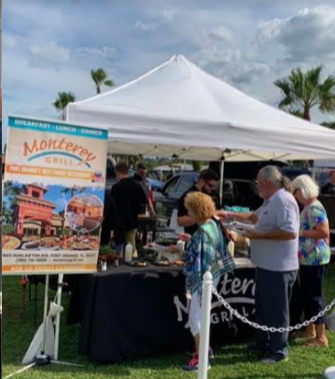
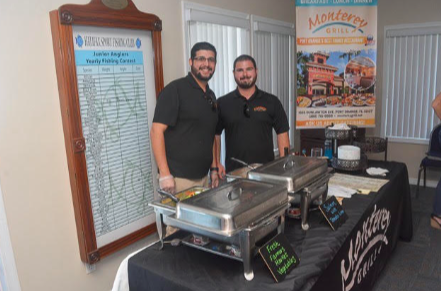
Deprecated: Creation of dynamic property WP_Term::$cat_ID is deprecated in /home/cleanpla/public_html/mk/wp-includes/category.php on line 378
Deprecated: Creation of dynamic property WP_Term::$category_count is deprecated in /home/cleanpla/public_html/mk/wp-includes/category.php on line 379
Deprecated: Creation of dynamic property WP_Term::$category_description is deprecated in /home/cleanpla/public_html/mk/wp-includes/category.php on line 380
Deprecated: Creation of dynamic property WP_Term::$cat_name is deprecated in /home/cleanpla/public_html/mk/wp-includes/category.php on line 381
Deprecated: Creation of dynamic property WP_Term::$category_nicename is deprecated in /home/cleanpla/public_html/mk/wp-includes/category.php on line 382
Deprecated: Creation of dynamic property WP_Term::$category_parent is deprecated in /home/cleanpla/public_html/mk/wp-includes/category.php on line 383
https://mk.cleanplate.us/digital/posting-on-facebook/
Deprecated: Creation of dynamic property WP_Term::$cat_ID is deprecated in /home/cleanpla/public_html/mk/wp-includes/category.php on line 378
Deprecated: Creation of dynamic property WP_Term::$category_count is deprecated in /home/cleanpla/public_html/mk/wp-includes/category.php on line 379
Deprecated: Creation of dynamic property WP_Term::$category_description is deprecated in /home/cleanpla/public_html/mk/wp-includes/category.php on line 380
Deprecated: Creation of dynamic property WP_Term::$cat_name is deprecated in /home/cleanpla/public_html/mk/wp-includes/category.php on line 381
Deprecated: Creation of dynamic property WP_Term::$category_nicename is deprecated in /home/cleanpla/public_html/mk/wp-includes/category.php on line 382
Deprecated: Creation of dynamic property WP_Term::$category_parent is deprecated in /home/cleanpla/public_html/mk/wp-includes/category.php on line 383
Deprecated: Creation of dynamic property WP_Term::$category_count is deprecated in /home/cleanpla/public_html/mk/wp-includes/category.php on line 379
Deprecated: Creation of dynamic property WP_Term::$category_description is deprecated in /home/cleanpla/public_html/mk/wp-includes/category.php on line 380
Deprecated: Creation of dynamic property WP_Term::$cat_name is deprecated in /home/cleanpla/public_html/mk/wp-includes/category.php on line 381
Deprecated: Creation of dynamic property WP_Term::$category_nicename is deprecated in /home/cleanpla/public_html/mk/wp-includes/category.php on line 382
Deprecated: Creation of dynamic property WP_Term::$category_parent is deprecated in /home/cleanpla/public_html/mk/wp-includes/category.php on line 383
Why? To connect with your guests on social media and have an ongoing presence on their feed when not at the restaurant, as well as connect with those that may not have visited us before. This will lead to engagement, loyalty and increased sales. Expectation: Your goal is to post at least twice per week … ]]>
To connect with your guests on social media and have an ongoing presence on their feed when not at the restaurant, as well as connect with those that may not have visited us before. This will lead to engagement, loyalty and increased sales.
Expectation:
- Your goal is to post at least twice per week with engaging content on your Facebook page. You should include a photo or video and text description that makes your fans want to respond and interact with you.
- What does interaction mean?
- Likes, shares, comments, views or visiting the restaurant in response to what they saw. Every time a guest interacts with your post, it’s more likely to be shown to their friends.
- What does interaction mean?
More interactions= more views of your restaurant.
- Examples of engaging post content includes:
- Food photos (or videos)
- Daily specials
- Photos or videos of your team
- Menu features
- Flash deals
- Questions to your guests
- Contests
- Community involvement
- Event photos/cross promotion
- Photos of your guests in restaurant (with permission)
- Special hours of operation
- Holidays
- There should be at least one person trained in your restaurant on how to post on social media (if not more) and all posts should be approved by the GM.
- If you need help having someone added to a page, please contact Kathryn.
- It is helpful to have a plan at the beginning of the week or month of what you want to accomplish from your page. Having a clear, thought out plan with what you will be posting will keep you organized and keep content engaging for the guests.
How to Post on Facebook:
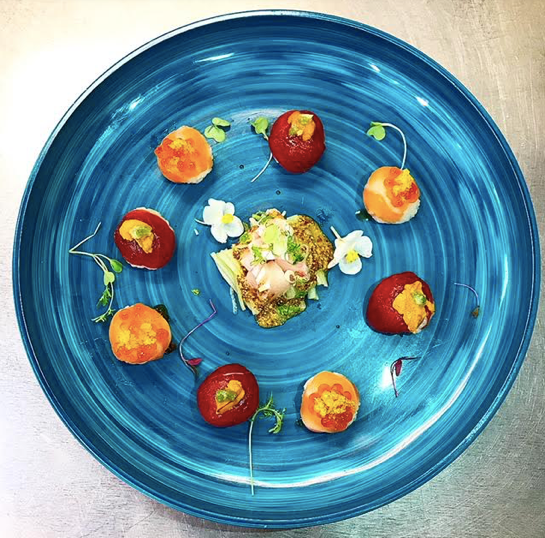
Always use a photo with a post. Decide what you’d like to feature and be sure to take or use a clear photo.
Tips:
- Use a flash or
be in a very well-lit area. Use real sunlight when possible.
- If a food
photo, menu item should appear as it would being served.
- Wipe off any drips or spills on the plate
- Place colorful items on a plain background with muted colors
- Ensure any background items look neat and clean (ie. If taking a photo of prep in the kitchen, make sure rags are away, prep boards are clean and garbage not overflowing)
- Don’t include too many things in the photo, keep it simple.
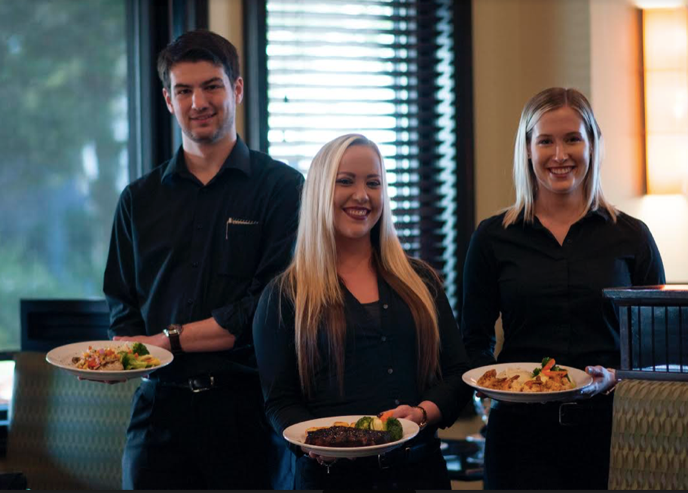
- If team members are in the photo, make sure they are smiling and uniforms look neat.
- Should not be blurry or hard to see item
- Always ask a guest for permission to post if including them.
- If a food
photo, menu item should appear as it would being served.
- Examples:
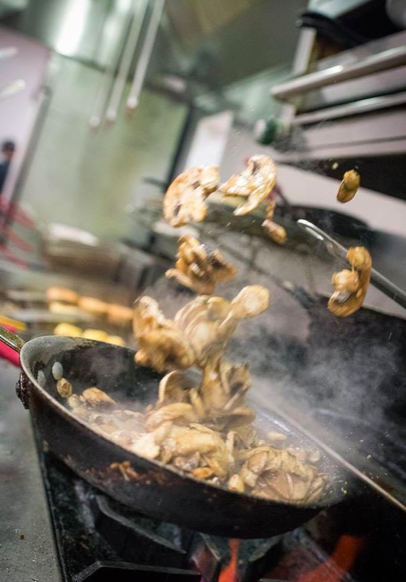
- Once you have the photo you’d like to post, go to your restaurant’s Facebook Page and scroll down until you see this:
- Click the Photo/Video button on the bottom left.
- Click Upload Photo/Video.
- Choose the photo or video you’d like to post in your library or take on live, and hit Choose on the bottom right.
- This should show you the photo on the post
- Now that you have your photo, write an engaging description
of it.
- Be sure all words are spelled correctly, correct grammar and punctuation is used and no slang.
- If your Facebook is linked and automatically posts to Instagram, use # as needed
- Ensure all information you listed is correct (dates, prices, etc)

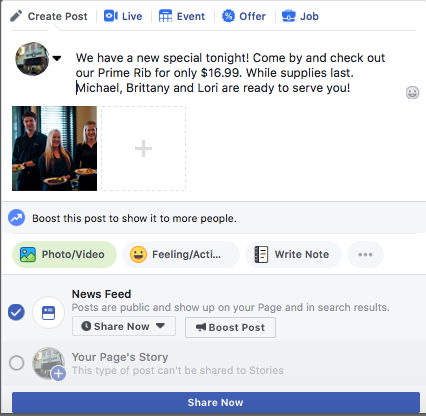
- Hit “Share Now” on the blue box on the bottom if ready to post immediately.
- If you’d like to post at a different day and time:
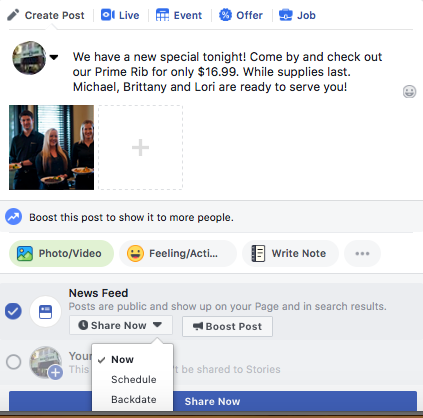
- Choose Share Now with the drop down arrow, then select Schedule. This will bring up a calendar to choose the date and time you’d like to schedule it to be posted.
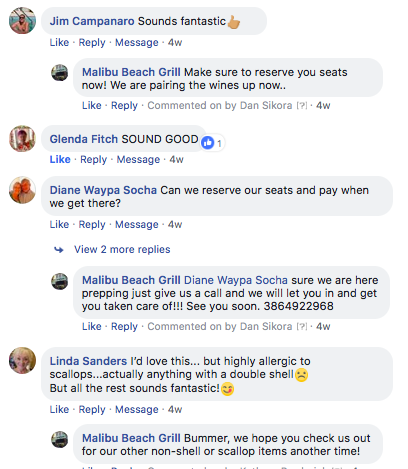
- Once it is posted, be on the lookout for your fans to comment on the post. If they do, be sure to respond to them with a like or comment back!
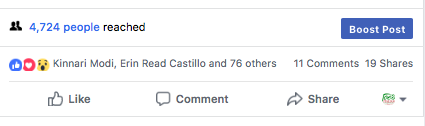
- You know you did something right when you see how many people you’ve reached with one post!
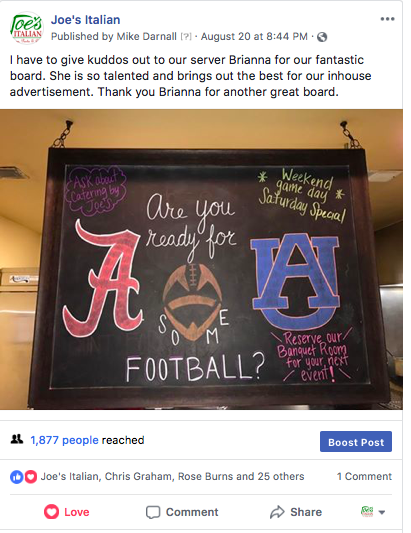
- If you do have a successful post or just have
something that would be great to promote even further, we can “boost” a post
with paid advertising. This should be done sparingly and only with your GM’s
permission. This means the post will go past your currently guests who like
your page and their friends and go to a new audience that we select.
- Please contact Kathryn for more information on this if interested.
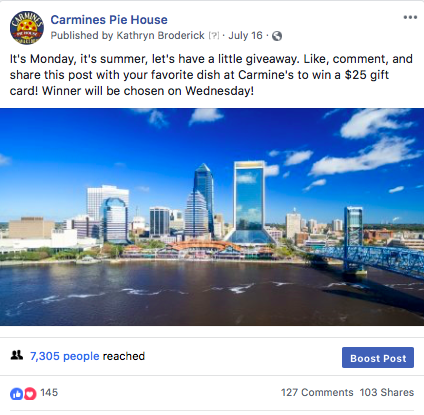
Example posts:
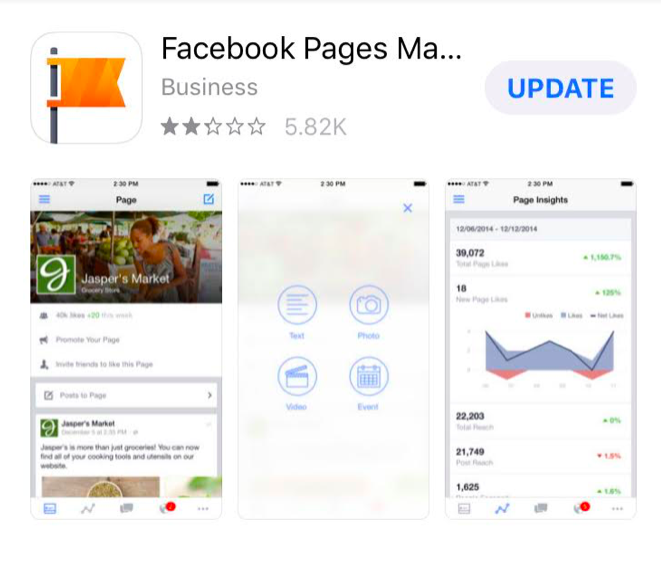
You can also post directly from your phone! To do so, download the Facebook Pages Manager app.
The steps to posting are similar to above.
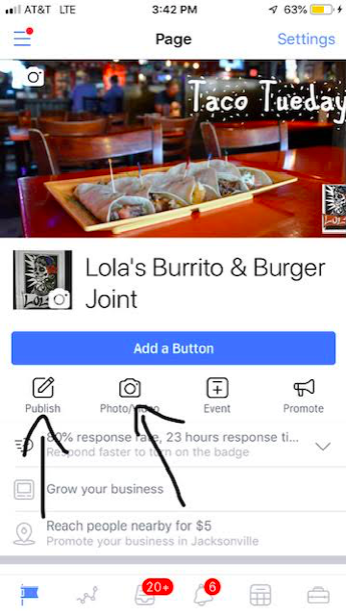
Once you’ve decided on your content, go to your restaurant’s home screen. Look for the Photo/Video button (the publish button will let you write text as a post, but highly recommended to post a photo with your content)
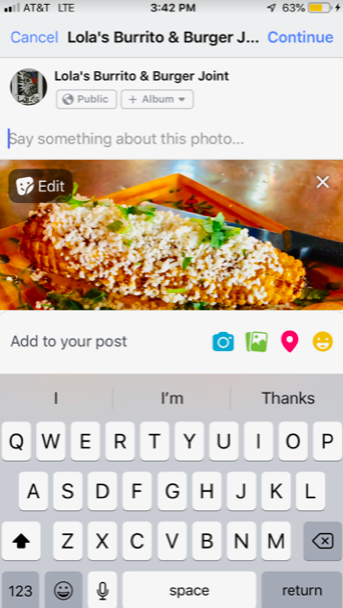
Click the Camera Photo/Video button and choose a photo from your library or take one live by choosing the grey camera icon on the far top left. Once chosen, the photo will appear.
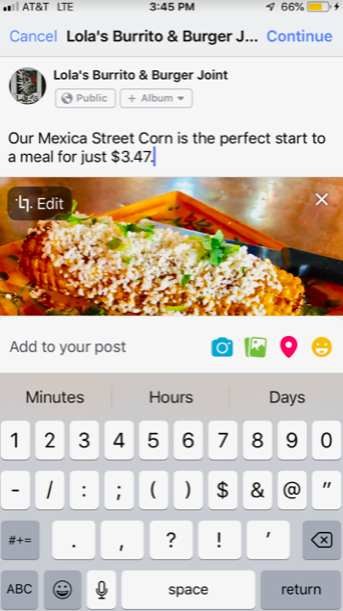
If this is the photo you want, now type in the text to describe it where it says “Say something about this photo”
Once your post is finished, hit Continue in the upper right hand corner in blue. It will bring you to this screen.
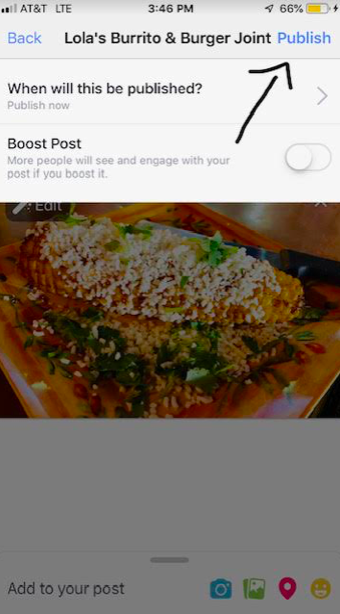
Click Publish in the upper right hand corner in blue to publish immediately. You can also schedule posts from here.
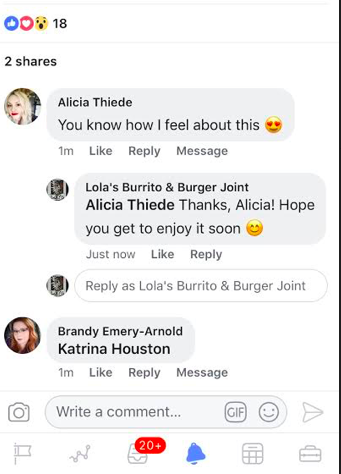
Be sure to monitor the app for replies to your post and respond back through the app to make it appear as you are responding as the restaurant instead of yourself!
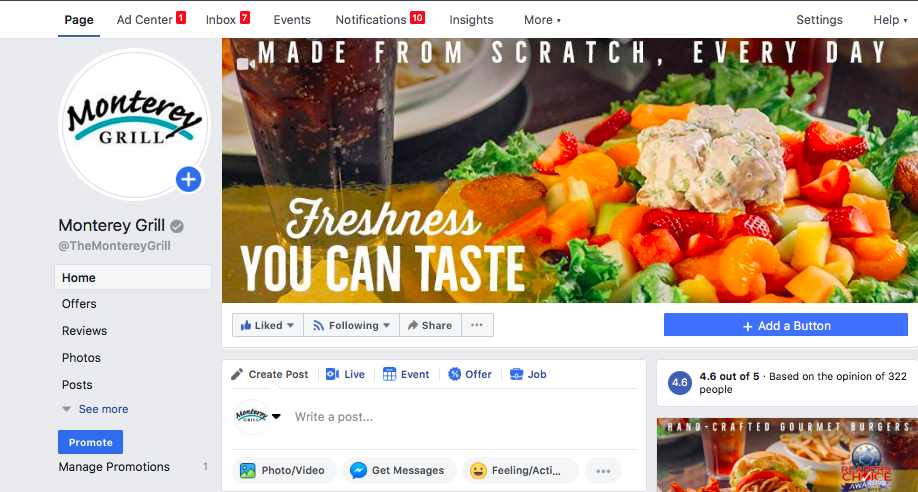
You’ll always know something happened on your page when you see the red box with a number in it next to one of the categories on the top. The Notifications tab shows you all new activity including messages, comments, likes, shares and check-ins. Some of these notifications may not be action worthy, but if you see something you can respond to, you should try.
Stay ahead of new information on your page by checking the notifications (you’ll know if something is unread by having a number with a red box).
These include new messages, comments, likes, shares and check-ins.
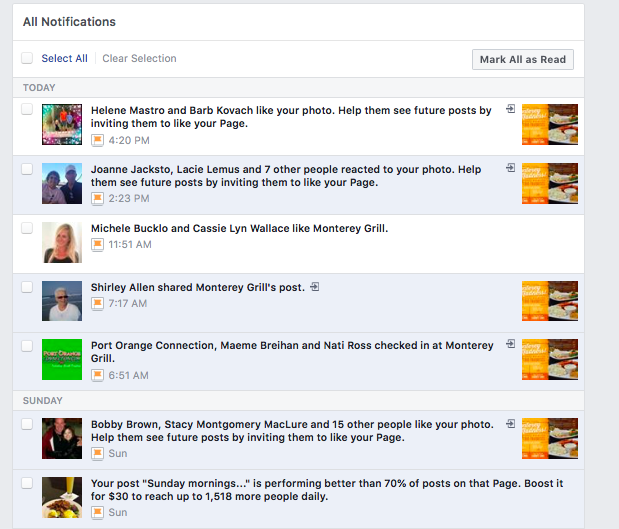
| Clicking on notifications will show you all of the new activity. | |||||||
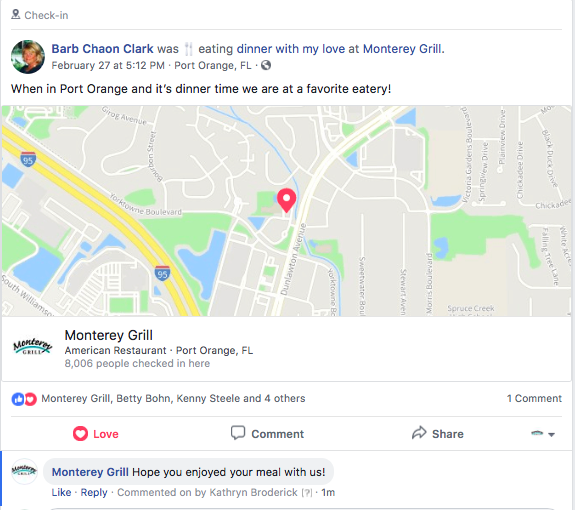
| If there are any action items (someone commented and you haven’t responded, you can invite people to like your page or you see a check-in), click on the highlighted blue area and it will take you to that screen. Check-ins are something I’d encourage you to try to stay on top of, even when not in the restaurant. Guests can choose to “check in” to any business and it tags us. Guests usually check in while still in the restaurant, so you can see how things are going in real time. Sometimes it just says they are there, other times it has more information like them saying it’s a birthday. Being able to immediately tell them we hope they enjoy, or happy birthday, or whatever it might be as they just get to the restaurant, let’s them know we are responsive and happens in real time. It’s a nice digital way to do a table touch. | |||||||
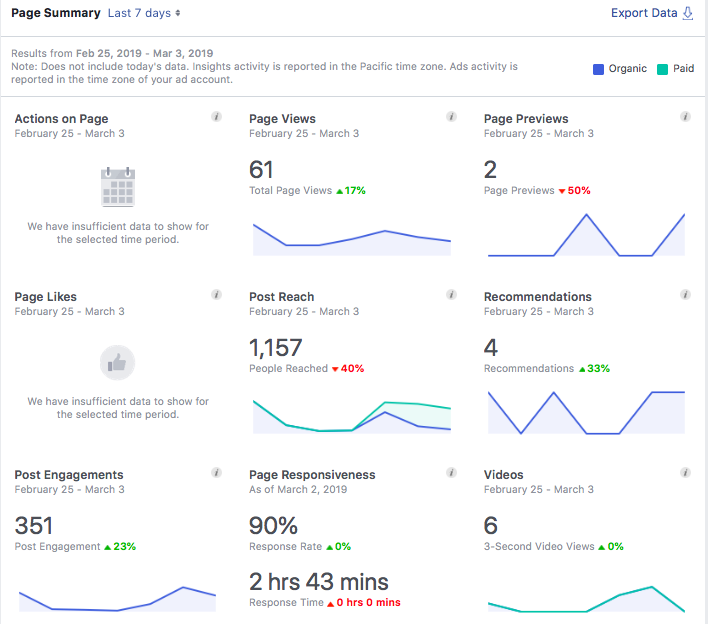
| Next to the Notifications tab is one called Insights, that really lets you know how you’re doing with your page. There’s a lot of information on this page, and you can click into any of the categories to see more. The thing I look for the most are Post Reach and Engagements. Post reach is your post got to their screen in any way, via scrolling through a feed or going directly to your page. It means someone definitely saw what you put out there. Post engagement is the next step that they went so far as to comment, like, share or click on your post. The higher these are, the better we’re doing. This view is just the past seven days. |
Insights Overview
You can see more info on specific posts when you change the date range to the past 28 days.
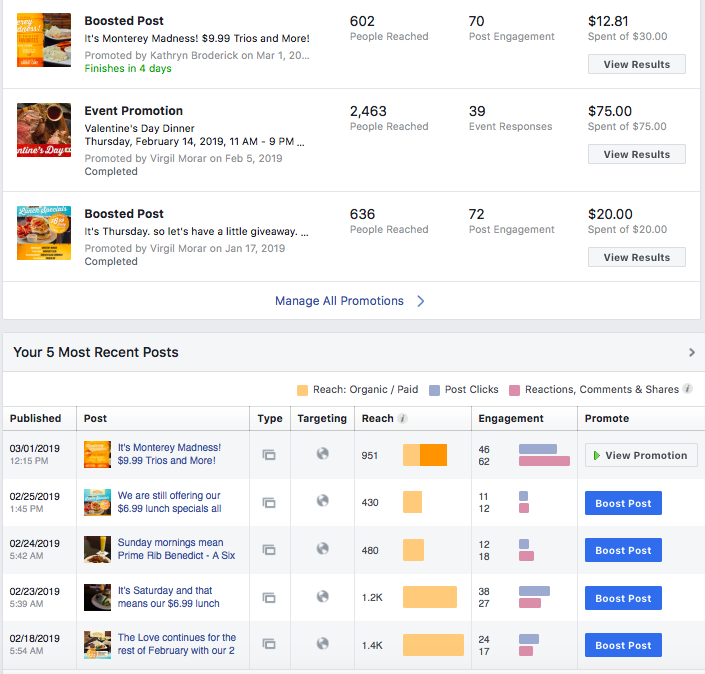
We run ads to promote page likes and boost specific posts on occasion. Please discuss with Kathryn and she will coordinate and budget. If we have a big promotion (ex: Valentine’s Day), putting $$ a day to promote it can help reach wider audiences.
*Note: Photos with more than 20% text can not be promoted and do not reach as far. Always try to use just a photo and fill in text above.
]]>Deprecated: Creation of dynamic property WP_Term::$cat_ID is deprecated in /home/cleanpla/public_html/mk/wp-includes/category.php on line 378
Deprecated: Creation of dynamic property WP_Term::$category_count is deprecated in /home/cleanpla/public_html/mk/wp-includes/category.php on line 379
Deprecated: Creation of dynamic property WP_Term::$category_description is deprecated in /home/cleanpla/public_html/mk/wp-includes/category.php on line 380
Deprecated: Creation of dynamic property WP_Term::$cat_name is deprecated in /home/cleanpla/public_html/mk/wp-includes/category.php on line 381
Deprecated: Creation of dynamic property WP_Term::$category_nicename is deprecated in /home/cleanpla/public_html/mk/wp-includes/category.php on line 382
Deprecated: Creation of dynamic property WP_Term::$category_parent is deprecated in /home/cleanpla/public_html/mk/wp-includes/category.php on line 383
https://mk.cleanplate.us/digital/posting-on-instagram/
Deprecated: Creation of dynamic property WP_Term::$cat_ID is deprecated in /home/cleanpla/public_html/mk/wp-includes/category.php on line 378
Deprecated: Creation of dynamic property WP_Term::$category_count is deprecated in /home/cleanpla/public_html/mk/wp-includes/category.php on line 379
Deprecated: Creation of dynamic property WP_Term::$category_description is deprecated in /home/cleanpla/public_html/mk/wp-includes/category.php on line 380
Deprecated: Creation of dynamic property WP_Term::$cat_name is deprecated in /home/cleanpla/public_html/mk/wp-includes/category.php on line 381
Deprecated: Creation of dynamic property WP_Term::$category_nicename is deprecated in /home/cleanpla/public_html/mk/wp-includes/category.php on line 382
Deprecated: Creation of dynamic property WP_Term::$category_parent is deprecated in /home/cleanpla/public_html/mk/wp-includes/category.php on line 383
Deprecated: Creation of dynamic property WP_Term::$category_count is deprecated in /home/cleanpla/public_html/mk/wp-includes/category.php on line 379
Deprecated: Creation of dynamic property WP_Term::$category_description is deprecated in /home/cleanpla/public_html/mk/wp-includes/category.php on line 380
Deprecated: Creation of dynamic property WP_Term::$cat_name is deprecated in /home/cleanpla/public_html/mk/wp-includes/category.php on line 381
Deprecated: Creation of dynamic property WP_Term::$category_nicename is deprecated in /home/cleanpla/public_html/mk/wp-includes/category.php on line 382
Deprecated: Creation of dynamic property WP_Term::$category_parent is deprecated in /home/cleanpla/public_html/mk/wp-includes/category.php on line 383
Instagram is becoming more and more popular, especially with younger audiences. While posting on Facebook should be your priority, linking your Instagram or taking photos specifically for your Instagram page can be a great next step in your social media plan. It is sometimes a different audience than Facebook, and gives those not ”connected” to … ]]>
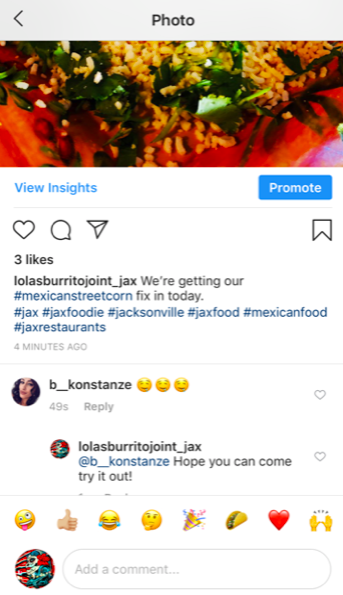
A hashtag # gives people a way to search for something in the same topic. For example, if I want to look up restaurant photos in Jacksonville, I might search the term #jaxrestaurants . Even though you may not know a specific hashtag, as you start typing, suggestions will pop up to search. You can even do generic searches like #food and scroll through photos.
How to post:
First, enter the login information and hit the + button on the bottom or go to your profile screen:
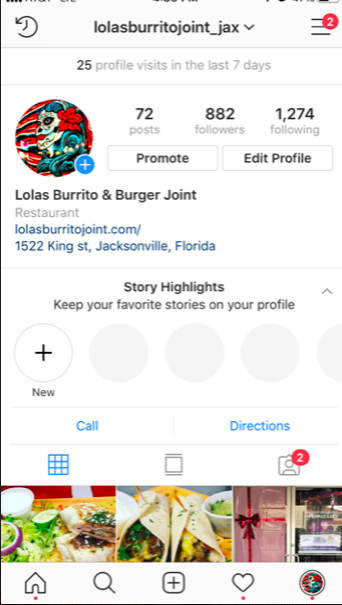
This will allow you to take a photo on the spot or choose one from your library.
| Once you have your selected photo, hit the blue Next in the upper right hand corner to bring you to editing. |
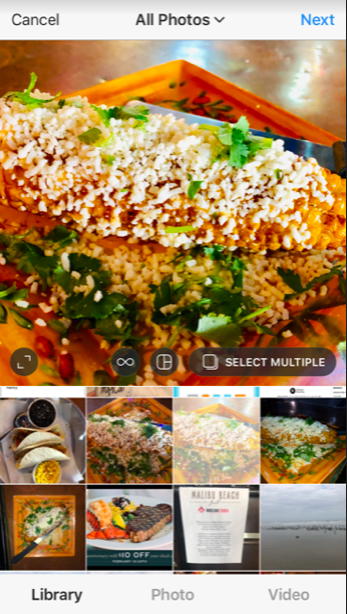
| You can also choose to take video. Just select what option you’d like on the bottom of the screen. | |||
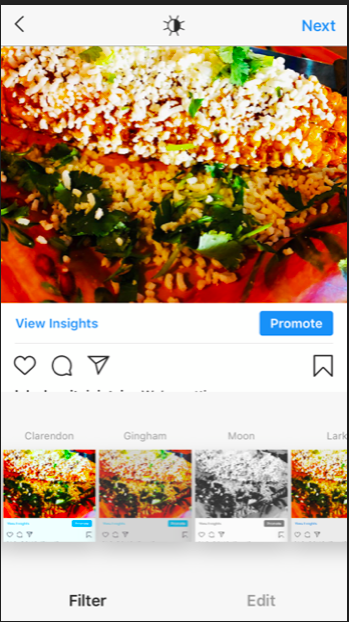
| You can choose a filter (shows your photo in different ways, scroll through to see options) or do regular editing (crop, brightness, etc) on the bottom. Once you are satisfied with how it looks, hit Next on the top. |
From there, it’s time to post your caption. You can tag different brands or people in your post with the @ sign and use hashtags # to allow people to do searches and find you.
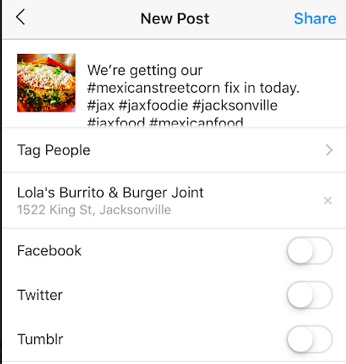
| If you have a Facebook account (all of you do) to link, you should. This gives you double the exposure and half the work of posting twice. Once ready, hit Share on the top to post. | |||||||
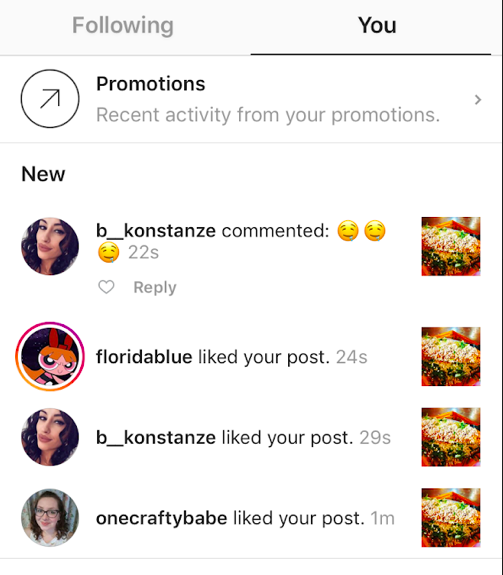
| This will inform you of how many likes and comments you’ve received. Click to it to view more information and respond to comments. | |||||||
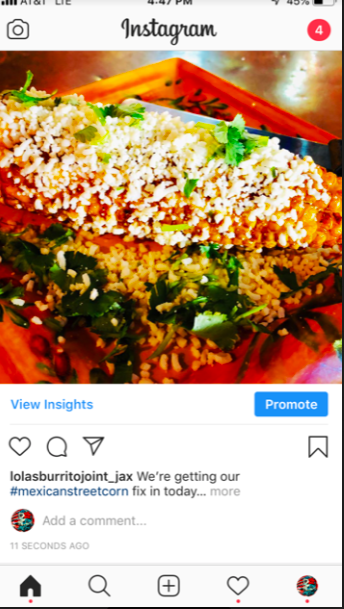
| Don’t forget to respond to any comments you get! |
Deprecated: Creation of dynamic property WP_Term::$cat_ID is deprecated in /home/cleanpla/public_html/mk/wp-includes/category.php on line 378
Deprecated: Creation of dynamic property WP_Term::$category_count is deprecated in /home/cleanpla/public_html/mk/wp-includes/category.php on line 379
Deprecated: Creation of dynamic property WP_Term::$category_description is deprecated in /home/cleanpla/public_html/mk/wp-includes/category.php on line 380
Deprecated: Creation of dynamic property WP_Term::$cat_name is deprecated in /home/cleanpla/public_html/mk/wp-includes/category.php on line 381
Deprecated: Creation of dynamic property WP_Term::$category_nicename is deprecated in /home/cleanpla/public_html/mk/wp-includes/category.php on line 382
Deprecated: Creation of dynamic property WP_Term::$category_parent is deprecated in /home/cleanpla/public_html/mk/wp-includes/category.php on line 383
https://mk.cleanplate.us/digital/email-marketing/
Deprecated: Creation of dynamic property WP_Term::$cat_ID is deprecated in /home/cleanpla/public_html/mk/wp-includes/category.php on line 378
Deprecated: Creation of dynamic property WP_Term::$category_count is deprecated in /home/cleanpla/public_html/mk/wp-includes/category.php on line 379
Deprecated: Creation of dynamic property WP_Term::$category_description is deprecated in /home/cleanpla/public_html/mk/wp-includes/category.php on line 380
Deprecated: Creation of dynamic property WP_Term::$cat_name is deprecated in /home/cleanpla/public_html/mk/wp-includes/category.php on line 381
Deprecated: Creation of dynamic property WP_Term::$category_nicename is deprecated in /home/cleanpla/public_html/mk/wp-includes/category.php on line 382
Deprecated: Creation of dynamic property WP_Term::$category_parent is deprecated in /home/cleanpla/public_html/mk/wp-includes/category.php on line 383
Deprecated: Creation of dynamic property WP_Term::$category_count is deprecated in /home/cleanpla/public_html/mk/wp-includes/category.php on line 379
Deprecated: Creation of dynamic property WP_Term::$category_description is deprecated in /home/cleanpla/public_html/mk/wp-includes/category.php on line 380
Deprecated: Creation of dynamic property WP_Term::$cat_name is deprecated in /home/cleanpla/public_html/mk/wp-includes/category.php on line 381
Deprecated: Creation of dynamic property WP_Term::$category_nicename is deprecated in /home/cleanpla/public_html/mk/wp-includes/category.php on line 382
Deprecated: Creation of dynamic property WP_Term::$category_parent is deprecated in /home/cleanpla/public_html/mk/wp-includes/category.php on line 383
Why? Email is one of the most direct ways to get information to an audience. Most people check email every day, and many check at least 20 times per day. Email goes directly to a customer’s inbox and a catchy subject line with information relevant to them will help get them to open it and … ]]>
Email is one of the most direct ways to get information to an audience. Most people check email every day, and many check at least 20 times per day. Email goes directly to a customer’s inbox and a catchy subject line with information relevant to them will help get them to open it and read about your business.
Estimated Time to Execute:
- The Marketing Manager will create the email blasts, you just need to provide any relevant content to include. This should take minimal time per month.
What:
- We have about 40,000 email subscribers across all our restaurants- which means 40,000 people who have opted in and WANT to hear more about what’s happening at your restaurant. Email can be a way to push sales immediately.
- It also gives us a chance to be very reactive if something happens we’re not expecting, like a sudden closure of the restaurant for maintenance or weather. It’s an immediate way to communicate with our guests.
- We also have “Smart Emails” which automatically track how often our guests are visiting and it sends automated emails for us to promote visiting more often.
How to Execute:
- The
restaurant has two responsibilities in terms of email marketing.
- Ensure servers know that our Wifi is connected to our email club. They should work to mention this to guests to keep increasing our signups (see below for more info)
- Let
the Marketing Manager know what content you’d like sent out in your email that
month or if you’d like multiple emails.
- Be
sure to include:
- All information such as date, specials, food descriptions
- Photos (the more the better!)
- Date to send if specific
- Some
email content that really is relevant to guests are:
- New Menu updates
- Special events
- Food holidays with specials
- Anniversary/Birthday event
- Monthly promotions
- Anything else important!
- Be
sure to include:
- In general, the more information you can send to the Marketing Manager, the better!